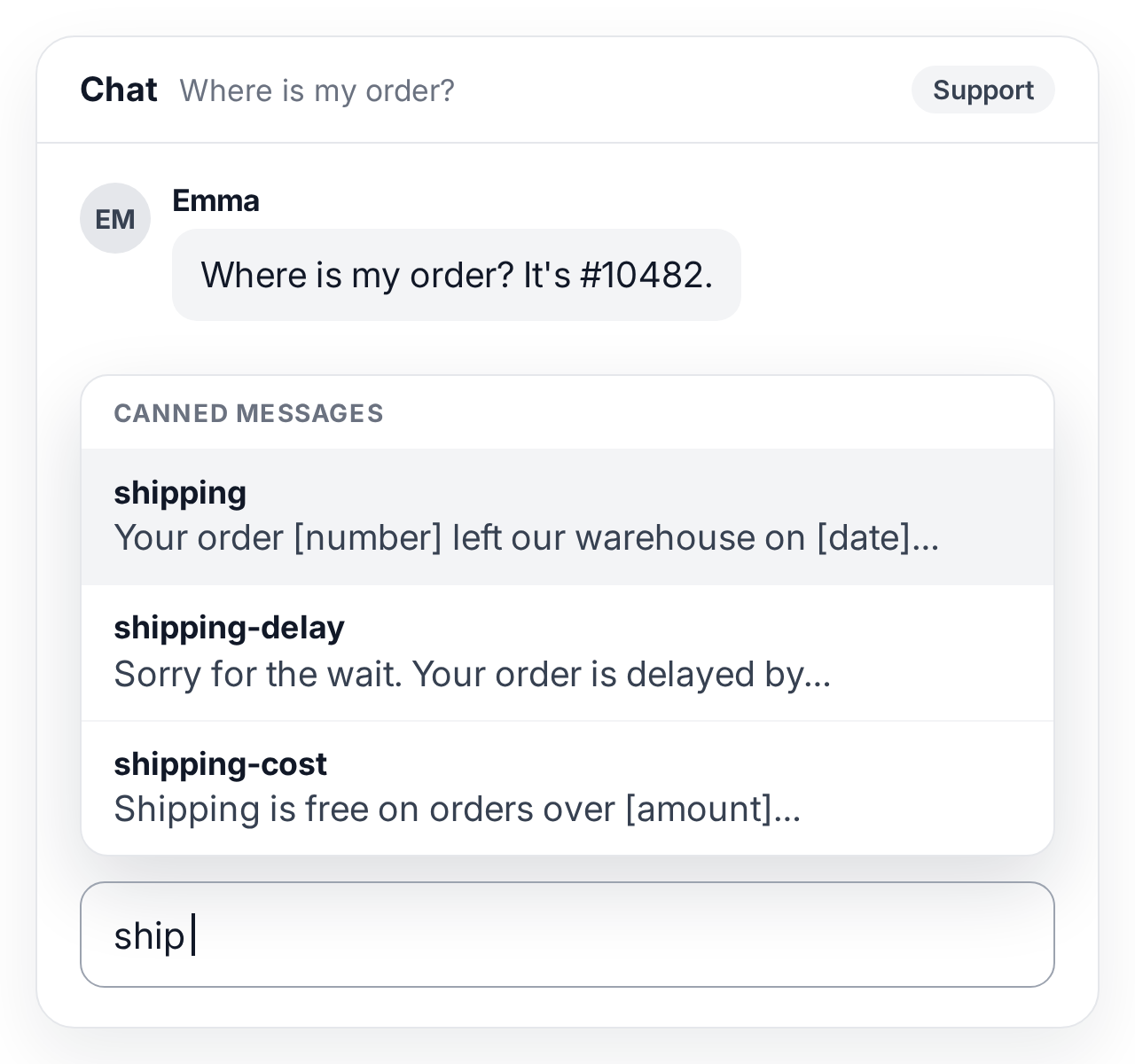
Canned responses save agents from typing the same answer many times a day and make sure every customer gets the same correct information. Help desks name them differently: Freshdesk calls them canned responses, Help Scout saved replies, Gmail templates (called Canned Responses until 2019), and Zendesk and Intercom use macros, which can also change the ticket; LiveAgent and many chat tools call them canned messages.
How do canned responses work?
Canned responses work in three steps: someone writes and saves the reply once, an agent finds it with a keyword or shortcut while answering, and the agent adjusts it to the customer before sending.
- Saved once. Each response has its text and a short name or keyword, and is shared with the whole team, one department or one agent.
- Found in seconds. In the reply box the agent opens the list or presses a shortcut and types a few letters of the keyword.
- Adjusted, then sent. The agent adds the customer’s name and details, removes what does not apply and sends it in the same channel.
What are examples of canned responses?
Good canned responses answer one common question completely and leave room for the customer’s details. Examples of canned email and chat responses, including difficult moments:
| Situation | Example canned response | What to change |
|---|---|---|
| Greeting in live chat | “Hi [name], thanks for reaching out. I’m [agent] and I’ll help you with this. What’s going on?” | The name, if known |
| Need more time | “Thanks for waiting. I’m checking this with our billing team and will reply within the next hour.” | The team and the real time |
| Order status | “Your order [number] left our warehouse on [date]. You can follow it here: [tracking link].” | Order number, date, link |
| Password reset | “You can set a new password at [link]. The link is valid for 24 hours; if it does not arrive, check your spam folder.” | Link, how long it is valid |
| Refund request | “I’m sorry the product didn’t work out. I’ve started your refund of [amount]; it reaches your account within [days] business days.” | Amount, days, an apology that fits |
| Upset customer | “I’m sorry, [name]. You expected [what was promised] and got [what happened]. Here’s what I’m doing now: [action]. I’ll update you by [time].” | The facts; write from scratch if it is serious |
| Problem or outage | “We’re seeing a problem with [feature] and our team is fixing it. I’ll email you as soon as it works again; no need to write back.” | The feature, a time if you have one |
| Out of hours | “Thanks for your email. We’re back at [time and time zone] and answer messages in order. Meanwhile this article may help: [link].” | Hours, the article |
| Feature not available | “[Product] can’t do [request] today. Here’s how other customers handle it: [workaround]. I’ve passed your request to our product team.” | The workaround |
| Closing a ticket | “I’m glad that’s sorted. If anything else comes up, just reply to this email and it will come straight back to us.” | Anything left open |
More ready-made wording is in the live chat templates, ticketing templates, angry customer responses and apology templates.
How are canned responses different from macros and templates?
A canned response inserts text, a macro inserts text and also changes the ticket, and a template is a longer prepared message such as a full email:
| Tool | What it does | Example |
|---|---|---|
| Canned response | Inserts a short prepared reply into a chat or ticket | The password reset answer |
| Macro | Inserts a reply and runs actions such as adding a tag, changing the status or assigning the ticket | Reply with the refund policy, tag “refund” and set to pending |
| Email template | A full prepared message, often with a subject, formatting and attachments | A welcome email for new customers |
| AI-suggested reply | A draft written for this ticket from its messages and your help articles | A reply that already mentions the customer’s order |
Why do canned responses matter?
Canned responses matter because most support teams answer the same few questions every day, and a saved answer makes every reply to them faster, consistent and correct. To see where they pay off, tag one week of tickets by topic: the ten most frequent topics are your first canned responses.
- Faster replies. Inserting a tested answer takes seconds, which shortens first response and average handle time.
- The same answer from everyone. Prices, deadlines and policies are stated the same way by every agent.
- Easier onboarding. New agents answer common questions correctly from their first day.
- Better wording. A response written calmly once reads better than one typed in a rush during a busy hour.
How do you build a canned response library in a small support team?
A small team builds a useful library by starting from its most frequent questions, writing short answers in its own voice and reviewing them as products change.
-
Find the repeated questions
Read the last few weeks of tickets and chats and list the ten questions that come up most often.
-
Write one short answer each
Answer the question fully in a few sentences, in your team’s voice, with gaps for the customer’s details and one clear next step.
-
Name them so they are easy to find
Give each response a short keyword agents will think of, such as ‘refund’ or ‘password’, and share it with the team or department that needs it.
Review them regularly
Update responses when a product, price or policy changes, and delete the ones nobody uses.
What are common canned response mistakes?
The most common mistake is sending a canned response that does not fit the question, which tells the customer nobody read their message.
- Not adjusting it. A reply without the customer’s name or details, or with a forgotten [name] gap, sounds automated.
- Answering a different question. Choose the response for what the customer asked, not for the nearest keyword.
- Outdated information. Old prices, links or deadlines spread to every customer who gets the response.
- Too long. Long canned replies are hard to adjust; keep one topic per response.
- One tone for every channel. A chat greeting reads differently from an email; keep separate versions where needed.
- Using one when you should write. Write from scratch when the customer is upset about something that went wrong, when the question involves security, legal issues or a billing dispute, or when the saved reply would need more than a couple of changes.
Canned responses in LiveAgent