



Email Notifications for Customer Support
Stay informed with LiveAgent's email notifications—never miss a reply or new ticket. Try a 30-day free trial, no credit card required.
2 min read
Email Notifications
Ticket Management
+1

Customize or disable notification sounds in LiveAgent—choose existing options or upload your own. Try it free for 30 days!
Tired of the same old notification tone? Customize or disable any notification sound that is played in LiveAgent. You can choose from existing sounds or upload your own file. Supported formats are mp3, wav, ogg. The maximum file size is 128 MB.
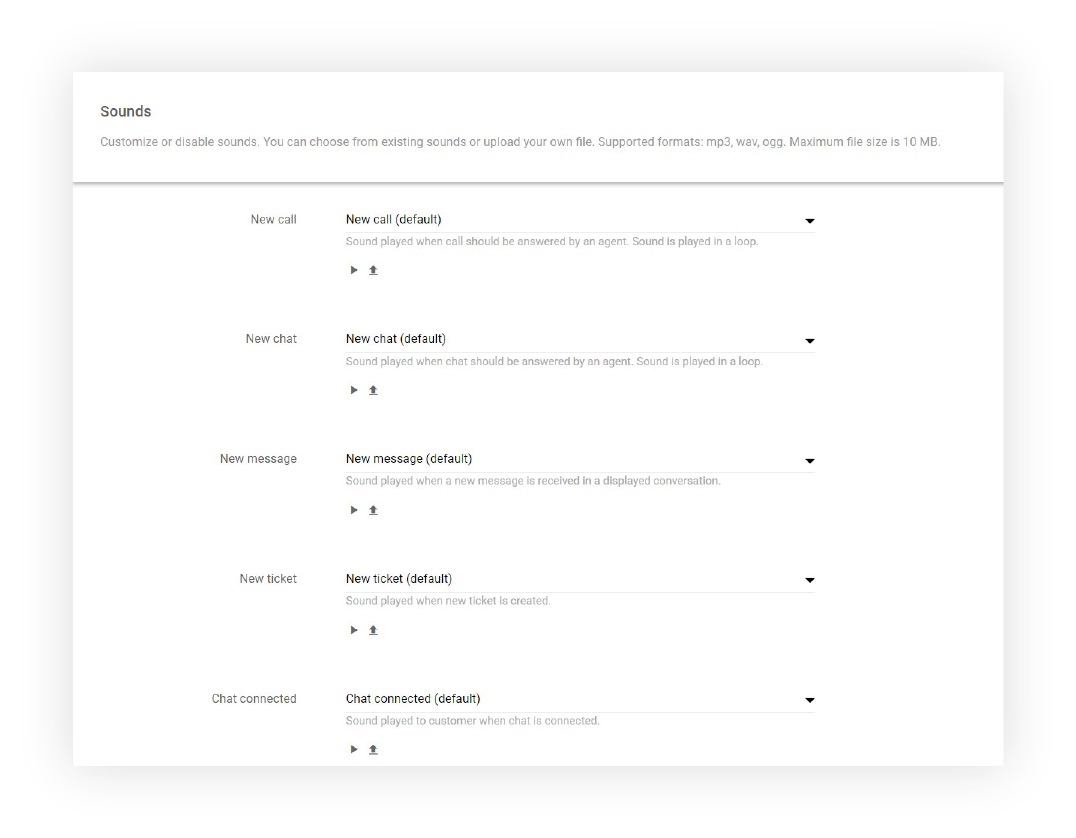
LiveAgent provides notification sounds for the following events:

Start your free trial today and see results within days.
Personalizing your notification sounds offers several benefits:
Need more help with sound configuration? Check out these detailed guides: LiveAgent Sounds Configuration
The latest tips and deals delivered straight to your inbox.
Sound customization works alongside LiveAgent’s email notifications and chat button settings to build a complete alert system — visual, audible, and inbox-based. Set distinct tones for each event so agents can recognize a new chat versus a new ticket without even looking at the screen, then fine-tune your chat button’s appearance to match.
Enhance your customer support experience with customized notification sounds. Start your 30-day free trial now. No credit card required.
Discover LiveAgent's powerful features that streamline communication, increase efficiency, and boost customer satisfaction.
Stay informed with LiveAgent's email notifications—never miss a reply or new ticket. Try a 30-day free trial, no credit card required.
Empower your team with LiveAgent AI Chatbot for faster and smarter support. Automate customer service, boost efficiency, and delight customers. Try free for 30 ...
LiveAgent enhances communication with attachments in emails, chats, forms, and knowledge bases. Easily drag & drop files like images, documents, and videos. Try...
Join our community of happy clients and provide excellent customer support with LiveAgent.

Cookie Consent
We use cookies to enhance your browsing experience and analyze our traffic. See our privacy policy.