



Agent Report Features
Get detailed insights into agent performance with LiveAgent's Agent report. Track work time, tickets, chats, calls, and more. Export data to CSV and use charts ...
3 min read
Reporting
Analytics
+1

Effortlessly export tickets into HTML, PDF, or CSV with LiveAgent’s powerful export feature. Enhance data analysis, reporting, and integration with this versatile tool.
With LiveAgent, managing and maintaining your customer data is a breeze. Our ticketing system allows you to easily export your tickets in various formats. Whether you need to print a ticket or analyze customer data, you can conveniently export your ticket in either HTML, PDF, or CSV format.
If you need a physical copy of your ticket, simply export it in HTML or PDF format, ready for printing. This feature allows you to have a tangible copy of your ticket at your convenience.
To export a ticket, go to the right side ticket menu and find a three dots icon next to the ticket ID.

There, you will find two options: Export to HTML and Export to PDF.
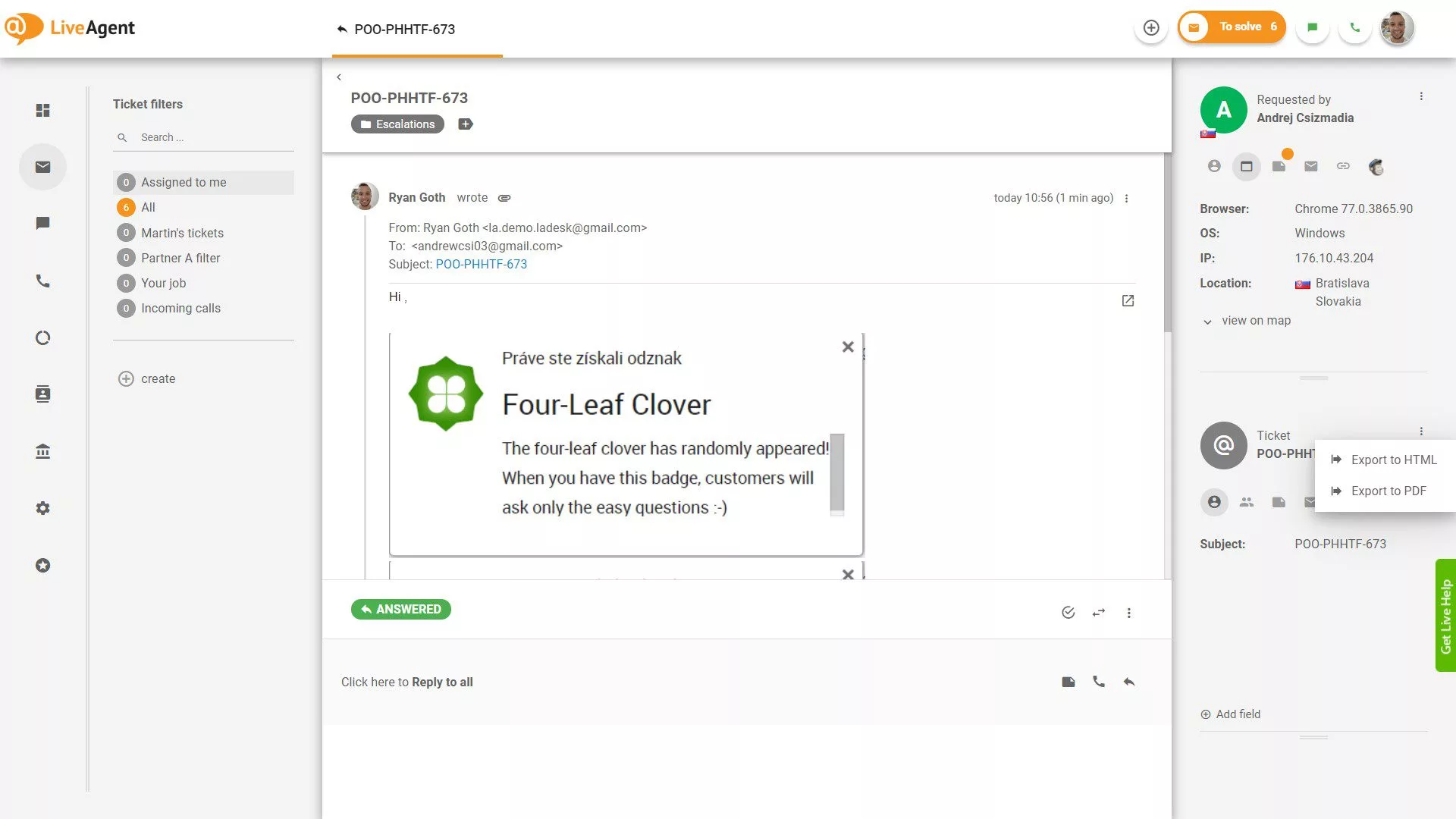
On the other hand, if you need to maintain and analyze customer data, you can easily export it using the Export to CSV option. With a simple click, you can download all the necessary data. Once exported, you can conveniently view and analyze this data using Excel.
The CSV export includes the following ticket data:
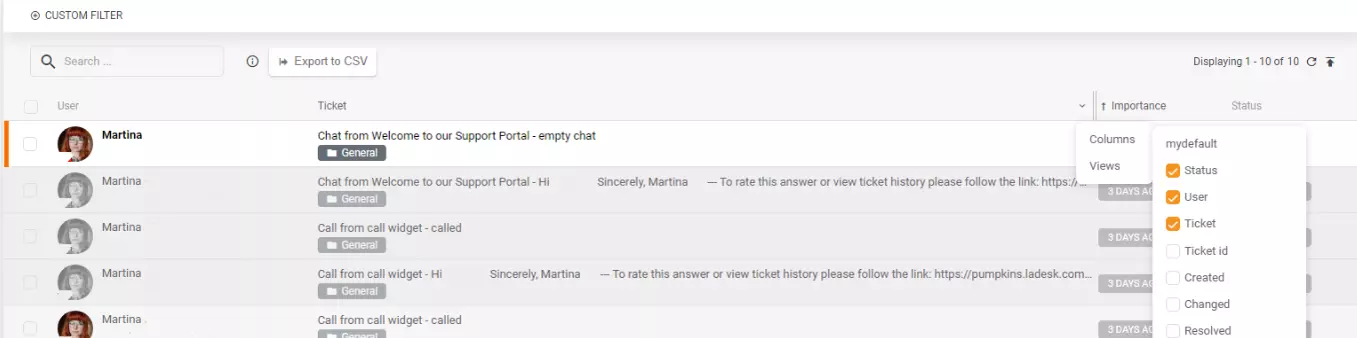
When you log into LiveAgent’s ticketing system, you will find the Export to CSV feature at the top, right next to the search bar.

Simply click on the Export to CSV button, and all your tickets will be exported into a .csv file.
In essence, LiveAgent provides you with the flexibility and convenience to manage your customer data in the way that suits your needs best.
You can even filter out specific columns or views your CSV export will contain.
Let’s now look at some benefits this feature can bring to your business.
Exporting tickets into formats like CSV allows for easy data manipulation and analysis. This can be particularly useful for identifying trends, tracking performance, and making data-driven decisions to improve customer service.
Exporting tickets into PDF or HTML formats can facilitate the creation of comprehensive reports. These reports can be shared with stakeholders and used in presentations. They can provide valuable insights into the efficiency of the help desk, common issues faced by customers, and areas for improvement.
By exporting tickets into different formats, the information becomes more accessible to different users. For instance, non-technical stakeholders might prefer a PDF report, while a data analyst might prefer a CSV file for further analysis. This flexibility ensures that everyone can access and understand the data, regardless of their technical expertise or the tools they have available.
Exported files can be easily imported into other systems for further analysis or processing. For instance, a CSV file could be imported into a CRM system, or a PDF report could be uploaded to a document management system. This can improve efficiency and ensure that data is consistently used across the organization.
Get detailed insights into agent performance with LiveAgent's Agent report. Track work time, tickets, chats, calls, and more. Export data to CSV and use charts ...

Discover the power of efficient ticket management with LiveAgent. Streamline customer support by converting issues into tickets, enhancing response times, and b...
Monitor your agents' availability in real-time with LiveAgent's comprehensive reporting tools. Easily filter stats by department, export data, and identify top-...
Cookie Consent
We use cookies to enhance your browsing experience and analyze our traffic. See our privacy policy.