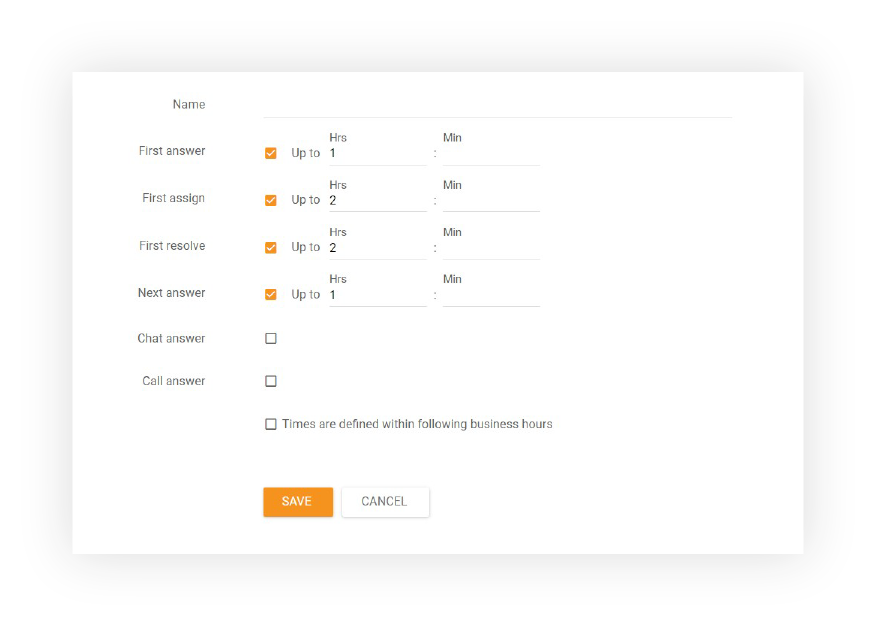
An SLA tells customers how soon they will hear back and tells agents which ticket to answer first. Service level agreement and SLA are the same thing; when the targets are internal rather than in a contract, teams also call them an SLA policy or service level targets.
What SLA metrics does a customer service SLA include?
A customer service SLA sets time targets for the moments a customer waits on: the first reply, every later reply and the solution, usually different for each channel and priority, and counted in business hours or around the clock:
| Target | What it measures | Example |
|---|---|---|
| First response time | Time from the request to the first reply from a person | 4 business hours for email |
| Next response time | Time from each customer reply to the next agent reply | 8 business hours |
| Resolution time | Time from the request to the solution | 2 business days |
| Chat answer time | Time a chat waits before an agent joins | 60 seconds |
| Call answer time | Time a caller waits in the queue | 80% of calls within 20 seconds |
Beyond the times, a written SLA states its scope (which channels, customers and ticket priorities it covers), when the clock runs (business hours with the team’s time zone and holidays, or 24/7), when it pauses (for example while waiting on the customer), who is alerted before a breach, and how often the targets are reviewed. A contract SLA may add what happens when a target is missed, such as service credits.
How do you calculate SLA compliance?
To calculate SLA compliance, divide the number of tickets that met a target by the number of tickets that had that target, and multiply by 100; track first response and resolution separately.
SLA compliance rate
Count in business hours if your SLA does, and leave out tickets that are still open and not yet due. With a 4-business-hour target and a 9:00–17:00 Monday–Friday schedule, a ticket opened on Friday at 16:00 is due on Monday at 12:00.
Example: In one month 400 tickets have a first-response target of 4 business hours. 352 get their first reply in time: 352 ÷ 400 × 100 = 88%.
Benchmark: 84.33% of tickets met their first-response SLA and 88% their resolution SLA across Freshdesk customers in 2021. Source: Freshdesk Customer Service Benchmark Report 2022 (vendor dataset), p. 8
What are good SLA targets for customer service?
A good starting SLA for a small support team is a first email reply within 4 business hours, chats answered within 60 seconds and 80% of calls answered within 20 seconds. There is no neutral standard, but published datasets show what teams achieve: about 6 hours on average to a first email reply and under half a minute of waiting in live chat.
| Channel and measure | Figure |
|---|---|
| Email and tickets, average first response (Freshdesk, 2021) | 6.0 h |
| Email and tickets, average resolution (Freshdesk, 2021) | 39.7 h |
| Live chat, average wait before an agent answers (Comm100, 2024) | 23.6 s |
| Phone, traditional service level target | 80% in 20 s |
Sources: Freshdesk Customer Service Benchmark Report 2022 and Comm100 Live Chat Benchmark Report 2025, both vendor datasets; SQM Group for the phone target.
Set targets you can meet on a busy day, not on an average one: a target missed every Monday teaches the team to ignore it. For phone support, SQM Group suggests relaxing the 20-second target to 120 seconds, because it found no drop in satisfaction before then.
What does a customer service SLA look like?
A simple customer service SLA sets first-response and resolution targets by priority, in business hours unless it says 24/7:
| Priority | First response | Resolution |
|---|---|---|
| Urgent (service down, payment failed) | 1 hour, 24/7 | 8 business hours |
| Normal (how-to questions, account changes) | 4 business hours | 2 business days |
| Low (feedback, feature requests) | 1 business day | 5 business days |
Chats and calls get their own answer targets, because customers wait on them in real time. Customers on a premium plan can get a stricter level with the same structure. Written for customers, the same SLA can read:
We reply to every email within 4 business hours (Monday to Friday, 8:00 to 18:00 CET, except public holidays) and solve normal requests within 2 business days. Urgent issues, such as a failed payment, get a first reply within 1 hour, 24/7. Live chats are answered within 60 seconds during business hours.
Why do SLAs matter?
SLAs matter because they turn “we answer quickly” into a target the team can check: customers know what to expect, and agents know which ticket is due next.
- Clear priorities. Agents answer the ticket closest to its deadline instead of the newest or the easiest one.
- Fewer forgotten tickets. A ticket nobody owns becomes visible when its SLA is about to run out.
- Honest expectations. A published first-response time reduces “did you get my email?” follow-ups.
- Something to improve. SLA compliance shows week by week whether staffing and routing keep up with demand.
How do you set up an SLA in a small support team?
A small team can set up an SLA in four steps: pick the targets, decide when the clock runs, assign targets to tickets automatically and review compliance every week.
-
Pick two or three targets
Start with first response and resolution for email, and an answer time for chat or phone if you offer them. Base the numbers on what you achieve today.
-
Decide when the clock runs
Choose business hours or 24/7, set your time zone and holidays, and say so wherever you publish the SLA.
-
Assign targets automatically
Let your help desk give each new ticket its SLA by priority, channel or customer, and warn the team before a ticket is due.
Review compliance weekly
Look at the missed tickets: a slow reply, a ticket in the wrong queue, a busy hour without enough agents. Fix the cause, then tighten the target.
What are common SLA mistakes?
The most common mistake is setting targets the team cannot meet, which makes the SLA a number everyone ignores.
- Promising 24/7 times with business-hours staff. Count the clock the way the team really works.
- Only one target. A fast first reply that says “we are looking into it” can hide slow solutions; track resolution too.
- No warning before a breach. A report of missed tickets at the end of the month is too late; alert agents while there is still time, and agree on escalation for tickets that are about to miss. Missed targets are covered under SLA violation.
- Pausing the clock too freely. Waiting for the customer can pause the clock, but waiting for another team should not.
- Same target for every request. A failed payment and a feature request need different deadlines.
How is an SLA different from an SLO, OLA and KPI?
An SLA is the promise to customers, an SLO (service level objective) is one target inside it, an OLA (operational level agreement) is a promise between internal teams that supports it, and a KPI is any number you track, whether or not anything was promised:
| Term | What it is | Example |
|---|---|---|
| SLA | The agreement or policy, with its targets and terms | “We reply to every email within 4 business hours” |
| SLO | One measurable target within the SLA | First response within 4 business hours for 90% of tickets |
| OLA | An internal agreement between teams that supports the SLA | Billing answers escalated tickets within 1 business day |
| KPI | A metric that shows performance | SLA compliance, first call resolution, CSAT |
SLAs in LiveAgent