
Key takeaways
- The difference is permission to act, not how smart the model is.
- Give each AI agent one job. One AI agent can work in several places and still counts once.
- An AI assistant helps a person write. The person decides and sends.
- LiveAgent charges nothing for AI. Plans count AI agents (1, 5, 50 or unlimited), and you pay your AI provider.
In this article:
- What is the difference between an AI agent and a chatbot?
- What is a chatbot?
- What is an AI agent?
- AI assistant vs AI agent: where does the AI Answer Assistant fit?
- AI agent vs chatbot: which one does a support team need?
- How does LiveAgent count AI agents on each plan?
- How do you give an AI agent safe permissions?
- How LiveAgent helps with chatbots and AI agents
What is the difference between an AI agent and a chatbot?
A chatbot talks and an AI agent acts. A chatbot replies to the person in front of it. An AI agent has instructions, a model and a list of things it may read and do, so its work can reach past the conversation, into tickets for example.
Vendors use both words loosely, so most chatbot vs AI agent comparisons blur them. The table below sets out one clear meaning for each. It also adds a third type, the AI assistant, because many teams mix it up with the other two.
| Chatbot | AI agent | AI assistant | |
|---|---|---|---|
| What it does | Answers questions in a chat | Does a defined job, such as answering chats or working on tickets | Drafts or improves text for a person |
| Who it talks to | Website visitors | Visitors, tickets or other tools, depending on its job | Your support agent |
| Can it change data? | Not by itself, it answers | Yes, if you give it tools that change data | No, it only produces text |
| Who sends the reply? | The chatbot | The AI agent, if you allow it | A person, always |
| What you set up | Content to answer from | Instructions, provider and model, allowed tools | A provider and model |
| In LiveAgent | One place an AI agent works (“Chatbot on your websites” on the pricing page) | Counted per plan: 1, 5, 50 or unlimited | The AI Answer Assistant: it drafts, a person sends |
The first five rows describe the general idea. The last row and the rest of this guide show how each type works in LiveAgent.
What is a chatbot?
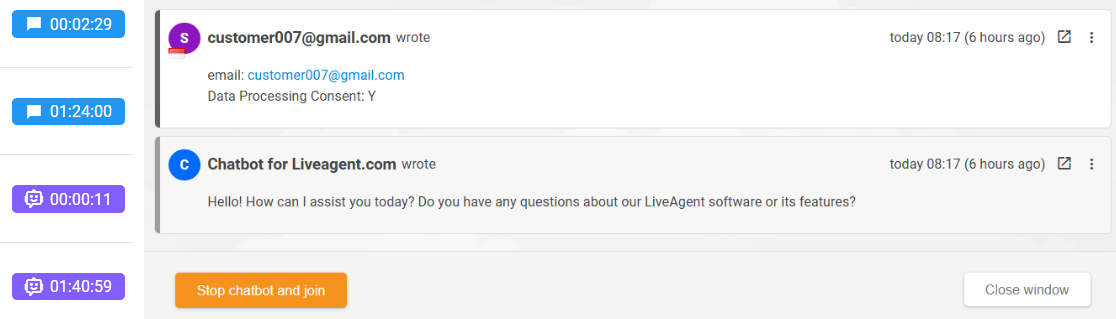
A chatbot is software that talks with a visitor in a chat window. A rule-based chatbot follows fixed menus and decision trees, so it only handles the paths someone built. An AI chatbot writes answers in free text from the content you give it.
Both kinds share one limit. They answer, but they do not act. If a visitor asks “Where is my order?”, a chatbot can explain how tracking works. It cannot change the ticket on its own. That needs an AI agent with permission to act.
LiveAgent includes live chat and a chatbot on every plan.
What is an AI agent?
An AI agent is an AI worker you set up once. LiveAgent describes it on its pricing page as having “its instructions, the AI provider and model it runs on, and what it’s allowed to do.” Those three parts are the whole idea, so it helps to take them one by one.
- Instructions. A plain-language job description. An example from the pricing page is “Answer questions from our help articles. Hand over to a person when unsure.”
- Provider and model. The AI service that does the thinking. You choose from OpenAI, Anthropic, Google Gemini and FlowHunt, and you choose the model.
- Permissions. What the AI agent may read and do in LiveAgent. An AI agent reads a ticket through tools, such as one that gets the ticket messages.
The pricing page shows these three parts in an example agent named “Support assistant”. Your own AI agent can be as narrow as you like.
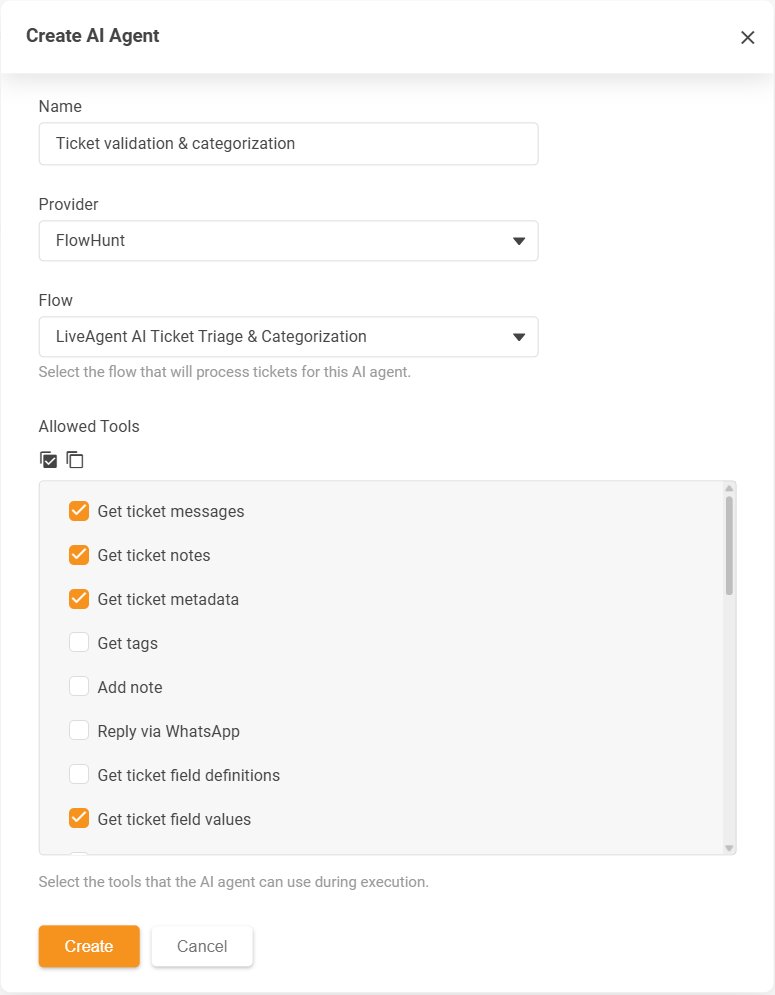
The Create AI Agent dialog with its Allowed Tools list. Each AI agent runs on one provider: OpenAI, Anthropic, Gemini or FlowHunt.
According to the pricing page, an AI agent works in four places: “Chatbot on your websites”, “Ticket replies”, “Ticket triage” and “Automation rules”. That list shows why the two words overlap. The chatbot is simply one place an AI agent works.
You may also see the term agentic AI. It is the general name for AI that plans and takes steps toward a goal. An AI agent is one working example.
AI assistant vs AI agent: where does the AI Answer Assistant fit?
An AI assistant helps a person do the work, and the person stays in charge. An AI agent can be given a job to do itself. This is the third type in the table above, and it is easy to confuse with an AI agent.
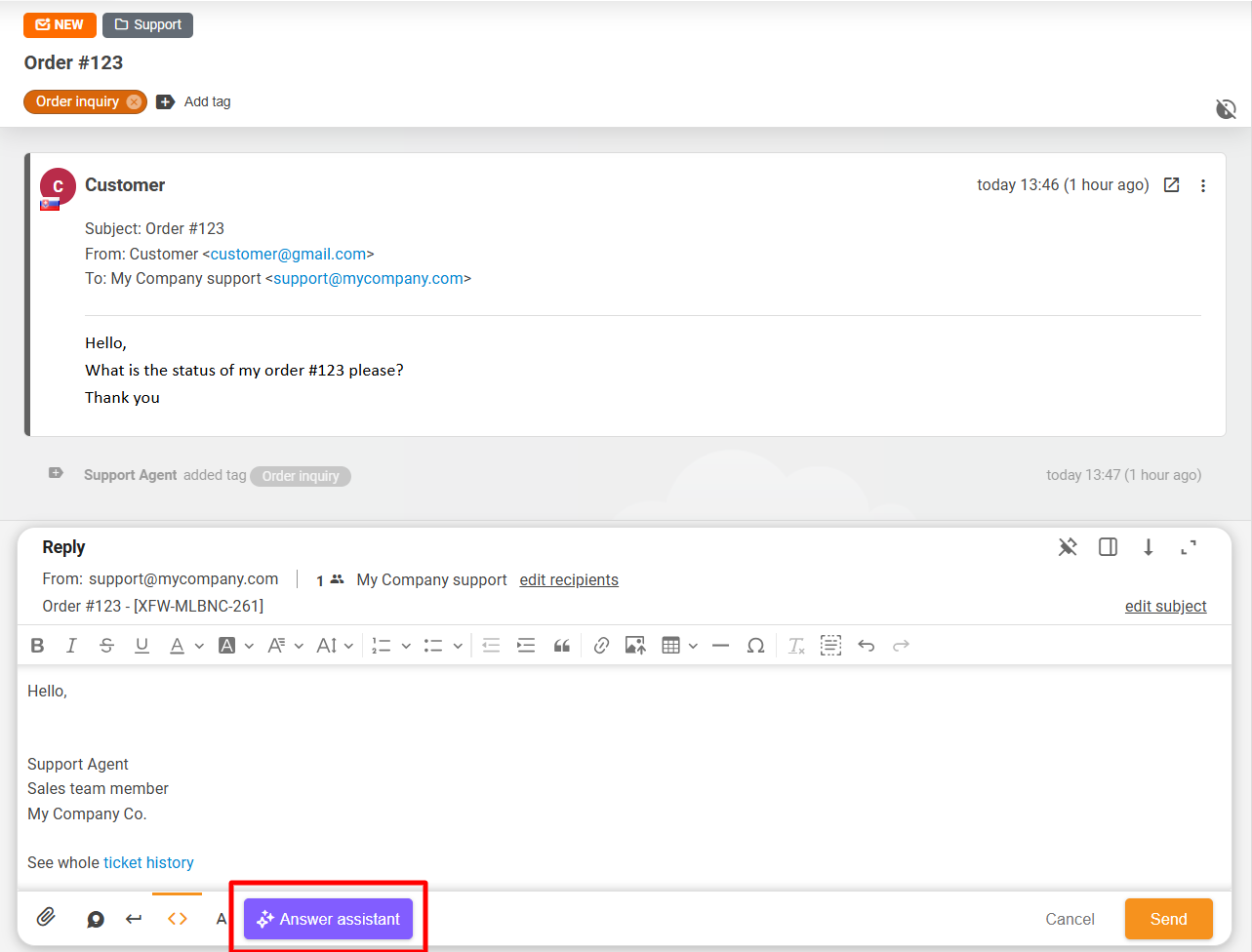
In LiveAgent, this is the AI Answer Assistant. It adds one button, “Answer assistant”, to the reply editor. You can also open it with Ctrl+Shift+A (Cmd+Shift+A on a Mac). It works in email replies and in the reply editor for Facebook, Instagram direct messages, Telegram, X, Viber, WhatsApp and knowledge base replies.
The AI Answer Assistant can:
- write a full reply from the ticket conversation (“Generate answer”), with an optional instruction;
- improve a draft you already wrote (“Improve”);
- write text from a short idea;
- extend or simplify text, and switch between “Casual formality”, “Neutral formality” and “Business formality”;
- move between draft versions with “Back” and “Forward”.
It keeps the language of your text. It reads the real conversation messages of the ticket, oldest first, and leaves out internal notes and system events.
Nothing is sent automatically. “Use in answer” puts the draft into the reply editor, and the agent then reads it, edits it and sends it. That is the whole difference in the AI agent vs assistant question: the assistant drafts, a person decides.

Join our newsletter
The latest tips and deals delivered straight to your inbox.
AI agent vs chatbot: which one does a support team need?
Most support teams need both, and each should have a narrow job. A chatbot is enough when the work is answering the same website questions. An AI agent becomes worth it when the work includes sorting or changing tickets, or when AI should act inside the help desk.
The table below is our take on AI agents vs chatbots in customer service, job by job. This is a recommendation, not a rule.
| Job | Use | Why |
|---|---|---|
| Answer repeated questions from your help articles on your website | Chatbot | One correct answer, and no change to any data |
| Sort new tickets | AI agent | The work happens on the ticket, so the AI needs permission to act |
| Write email replies faster | AI Answer Assistant | A person should read and send each reply |
| Refunds, complaints, upset customers | A person | These need judgment, and some actions cannot be undone |
Here is an example. A team of 6 agents gets 300 emails a week, and many of them ask about shipping times. The team could let the chatbot answer shipping questions on the website, give the agents the AI Answer Assistant for the email replies they write, and keep refunds with people. The numbers are an illustration, not a result.
Start with the job that has one correct answer and a low cost of mistakes. Add the next one only after you have read what the first one actually did. Our guide on how to deploy an AI customer service agent shows the rollout steps. For a view that also includes human live agents, read virtual assistants vs chatbots .
How does LiveAgent count AI agents on each plan?
LiveAgent does not charge for AI, but each plan limits how many AI agents you can create. Every plan includes all AI features. On AI, the plans differ in this number and in one more thing: connecting external AI tools over MCP is only on Business and Enterprise.
| Plan | Billed annually | Billed monthly | AI agents included | External AI tools over MCP |
|---|---|---|---|---|
| Starter | $15 per agent/month | $19 per agent/month | 1 | No |
| Team | $29 per agent/month | $35 per agent/month | 5 | No |
| Business | $49 per agent/month | $59 per agent/month | 50 | Yes |
| Enterprise | $3,199 per month, flat fee | $3,999 per month, flat fee | Unlimited | Yes |
The Enterprise price is flat, and it includes 80 agents. Check the pricing page for the current numbers before you decide.
One AI agent can work in many places and still counts once. For example, the same chatbot on three websites uses one AI agent.
On cost, the pricing page puts it this way: “Just your plan price. No AI fees, no token markup, no per-resolution fees.” The AI provider you connect bills you directly, at its own prices, and you can switch providers at any time.
Some built-in AI does not use an AI agent, so it does not count toward your plan. The pricing page lists summaries, call transcripts and translations (translations carry a “Soon” label). They run on your AI provider too.
How do you give an AI agent safe permissions?
Give an AI agent the smallest set of permissions that still lets it do its one job. The more tools you tick, the more the agent can change, so grow its access step by step.
- One job per AI agent. “Sort new tickets” is a job. “Handle support” is not.
- Start with read tools. Let the agent read ticket messages and tags first, and add tools that change data later. Add any tool that contacts customers last.
- Write a hand-over line. Tell the agent when to stop and give the ticket to a person, as the pricing-page example does with “Hand over to a person when unsure.”
- Test on a small queue. Run the agent on one ticket type before you widen it.
- Read what it did. Review a sample of its work every week for the first month, and tighten the instructions where it went wrong.
In LiveAgent, the Configuration > AI menu also has “AI Budgets”, next to “AI Agents”, “Chatbot” and “Answer Assistant”. Our article on the disadvantages of AI in customer service covers the risks in more detail.
How LiveAgent helps with chatbots and AI agents
LiveAgent is our product. It puts a chatbot, AI agents and the AI Answer Assistant in one help desk, so your tickets, chats and AI settings sit in the same place.
You choose the AI provider for each AI agent: OpenAI, Anthropic, Gemini or FlowHunt. Every plan includes built-in MCP tools for your AI agents. On Business and Enterprise, you can also connect external AI tools such as Claude to LiveAgent’s MCP server.
Learn more on the pages for AI features , the AI chatbot , the AI Answer Assistant and the MCP server . If you want to build your first agent, our tutorial on setting up an AI customer service agent in LiveAgent walks through it.
Your next step
Pick one ticket type that arrives again and again. Write the instructions for one AI agent, give it read tools only, and run it on a small queue. You can try it in the free 30-day trial , and no credit card is needed.