
In this article:
- What are the main disadvantages of AI in customer service?
- Why does AI misread what customers actually mean?
- What happens when the AI gives a wrong answer?
- Can AI handle upset or complex customers?
- Why do handoffs to a human agent go wrong?
- Do customers trust AI with their personal data?
- How does LiveAgent help with these limits?
- Where should you start?
Each limit below comes with the evidence behind it and a fix you can apply before launch.
What are the main disadvantages of AI in customer service?
AI in customer service has five main limits: it misreads vague requests, gives confident wrong answers, struggles with complex or upset customers, can trap people away from a human, and raises data concerns. Qualtrics found that nearly one in five consumers who used AI for customer service saw no benefit.
Qualtrics’ 2026 Consumer Experience Trends Report, which surveyed more than 20,000 consumers in 14 countries in the third quarter of 2025, put that failure rate at almost four times the rate for AI use in general. In practice, chatbot disadvantages and AI agent disadvantages overlap heavily, so the limits below cover both. Our guide to AI service desks covers the wider risks of leaning too hard on AI chatbots.
| Limit | What goes wrong | The fix |
|---|---|---|
| Misread requests | The AI answers a question the customer did not ask | Ask one clarifying question, then hand over |
| Wrong answers | The AI states a policy or price that is not true | Limit answers to approved content |
| Complex or upset customers | The AI keeps trying when a person is needed | Route disputes and complaints to humans |
| Blocked human access | Customers loop through the bot with no exit | Show a human option from the first reply |
| Data worries | Customers do not know what the AI can see | Say what data the AI uses and keep sensitive fields out |
Why does AI misread what customers actually mean?
Customers often send short, vague messages like “my order is wrong,” and the AI has to guess which problem they mean. A wrong guess produces a confident reply to a question nobody asked. The fix is to let the AI ask one clarifying question, then hand over if the answer is still unclear.
“My order is wrong” could mean the wrong item, the wrong address or the wrong charge, and each one needs a different next step. A human agent asks which one. An AI agent that skips that question picks the most likely meaning and answers it.
Gartner analyst Eric Keller described the design principle in Gartner’s August 2026 press release : GenAI (generative AI) works better when it collects information, understands intent and tries to resolve the issue only when confidence is high, with a clear path to human support. To apply that, test the AI on real phrasing from your past tickets, not on tidy example questions. The tickets where customers wrote three words and a screenshot are the ones that break it.
What happens when the AI gives a wrong answer?
The company owns the answer. In February 2024, a British Columbia tribunal held Air Canada responsible after its website chatbot gave a customer wrong information about bereavement fares.
According to a law firm’s summary of the ruling (Moffatt v. Air Canada, 2024 BCCRT 149), the chatbot told the customer he could apply for a bereavement fare after travelling, which contradicted the airline’s own web page. The tribunal rejected the argument that the chatbot was a separate entity and said it was “still just a part of Air Canada’s website.”
Three controls reduce the risk, if your tool supports them:
- Restrict the AI to approved content, so it answers from your help center and nothing else.
- Tell it to say it does not know and hand over when the content has no answer.
- Keep refund terms, prices and policy exceptions with humans, or quote exact approved text.
Then read a sample of AI conversations every week. Wrong answers hide in the conversations where the customer believed the reply and never complained. Our guide to AI chatbot problems lists the warning signs to watch for.
Can AI handle upset or complex customers?
Less well as the problem gets harder. In a 2023 review of chatbots in consumer finance, the US Consumer Financial Protection Bureau wrote that chatbots may resolve basic inquiries, but their “effectiveness wanes as problems become more complex.”
The CFPB review covered banks, but the pattern fits any support queue: routine questions suit AI, and disputes do not. Send these to a person by default:
- Billing disputes and refund exceptions
- Cancellation requests
- Complaints from a customer who has already contacted you about the same problem
- Anything with a legal or safety angle
Let the AI collect the order number and the issue first, so the person starts with the facts. Our comparison of chatbots and live chat shows where each one fits.

Join our newsletter
The latest tips and deals delivered straight to your inbox.
Why do handoffs to a human agent go wrong?
Handoffs fail when customers cannot find the way to a person, or when the person starts from zero. In its 2026 survey of 3,566 customers , Gartner found that 87% say it is essential to have an option to reach a human agent when a company uses GenAI.
The same survey found that 50% of customers say interactions are easier when companies use GenAI. The pushback is aimed at AI that blocks the way to a person. Gartner also warns that customers forced through several failed AI attempts are less likely to use the tool again, and advises against making GenAI a mandatory first step for every issue.
The CFPB called the worst case a “doom loop”: a bot that repeats unhelpful answers “without an offramp to a human.” The fix is a visible “talk to a person” option in the first reply that stays there for the whole conversation. When the handoff happens, send the full conversation so the customer never repeats the problem.
Decide what happens when nobody is online too, because an offline form with a promised response time beats a dead end. Our article on the AI support paradox covers how to design that moment, and Will AI Replace Customer Service? has the full Gartner data on trust.
Do customers trust AI with their personal data?
Many do not. Qualtrics found that misuse of personal data is now the top concern for consumers when companies use AI to automate interactions, with 53% of consumers sharing the fear, up 8 points over the past year.
A support conversation can include addresses, order history and payment questions, so the concern is not abstract. Tell customers when they are talking to an AI and what it can see.
Keep payment details and ID numbers out of what the AI reads. Check the vendor’s data terms before you connect real tickets, using the questions in the FAQ below.
How does LiveAgent help with these limits?
LiveAgent is our product, and the features below are described as they work today.
In the AI Agent, an admin picks which actions each agent may take under Configuration > AI > AI Agents. The Allowed Tools list includes reading tickets, adding notes and tags, and replying by email or WhatsApp.
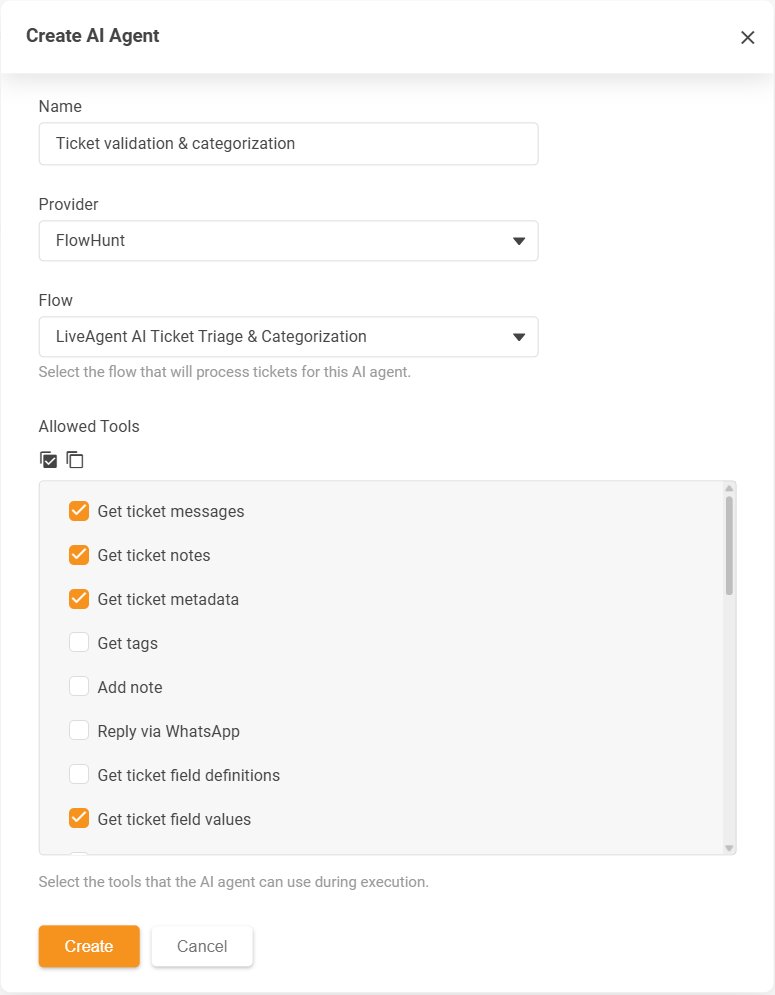
Tools that write act right away. If you tick Reply via email, the AI Agent sends the email without review, so leaving the reply tools unticked keeps the agent from messaging customers directly. The same list includes actions such as Resolve ticket and Update knowledge base article, which also take effect immediately, so tick only what each agent needs.
For drafts, LiveAgent has a separate feature. The Answer Assistant writes a reply from the ticket history inside the reply editor, and the agent edits and approves it before sending.
In live chat, LiveAgent’s AI human handover lets customers ask for a person with the Request chat with human agent button. An admin sets how many chatbot answers must come first in the “Required answers to initialize chat with human agent” field (3 by default, or 0 to show the button right away), and if no agent in the chat button’s department is available, the button turns into “Stop chatbot and leave offline message.” The agent and the visitor both see the earlier conversation in the same chat window and ticket.
Where should you start?
Start with the limit that costs you the most customers today. If you are unsure which one that is, begin with access to a person, since Gartner’s 87% figure shows how much customers care about it. When you are ready to launch, deploy your AI customer service agent in phases and read real conversations from day one.