


LiveAgent AI Ticket Summary
LiveAgent's AI Ticket Summary feature instantly turns long, complex support conversations into clear, structured summaries agents can read in seconds.
2 min read
AI Chatbot
Ticket Summary
+2

See how AI turns long support ticket conversations into structured internal notes automatically, so agents get instant context on every handoff.
Every support team has experienced the same friction point: an agent picks up a ticket mid-thread, scrolls through a dozen messages, and tries to piece together what happened before they can act. The customer has already explained their issue twice. A previous agent tried a workaround that failed. Somewhere in the thread, a manager made a promise the next shift knows nothing about.
Internal notes are supposed to solve this problem. In practice, they rarely do, because agents are too busy solving tickets to document them well.
AI ticket summary technology changes the dynamic entirely. Instead of relying on agents to write handoff notes from scratch, AI reads the full conversation thread and generates a structured internal note in seconds. The result is faster handoffs, fewer repeated questions, and a help desk that retains institutional knowledge across every shift change.
This article explains how to set up AI-generated internal notes, which tools do it best, and which practices turn a basic AI summary into a genuinely useful documentation layer for your support team.
Internal notes serve three critical functions in a support team: they capture decisions made during a ticket’s lifecycle, they brief the next agent on what already happened, and they create a searchable record for future reference. When these notes are missing or incomplete, the cost shows up in several measurable ways.

When an agent picks up a ticket without proper context, they spend time reading the full thread instead of jumping straight to the next action. Studies on help desk productivity suggest that agents lose between 15 and 30 seconds per ticket just orienting themselves, and on long-running tickets with 20 or more messages, that number climbs significantly. Multiply that across hundreds of tickets per day, and the productivity loss is substantial.
Beyond raw time, incomplete notes create duplicate work. Without a clear record of what was already tried, agents repeat troubleshooting steps. Customers notice. They grow frustrated explaining the same problem a third time. Satisfaction scores drop. Escalations rise.
Manual note-taking fails for the same reason any documentation task fails: it competes with the primary job. When an agent’s priority is resolving a ticket, writing a detailed summary of that resolution feels like overhead. The result is notes that are rushed, inconsistent, or simply absent.
A help desk software platform with built-in AI capabilities removes this tension entirely. The agent resolves the ticket. The AI writes the note. Neither task competes with the other.
The technology behind AI-generated internal notes has matured rapidly. Modern large language models can read an entire support conversation, public replies, private agent notes, chat transcripts, and even email threads, and produce a structured summary that captures the essential information a human agent needs.
Most AI ticket summarization systems follow the same basic workflow, though the implementation details vary by platform.
| Step | What happens | What the agent sees |
|---|---|---|
| Conversation ingestion | The AI reads the full ticket thread, including customer messages, agent replies, and any system notes or metadata. | Nothing, this happens in the background. |
| Context extraction | The AI identifies the core problem, key troubleshooting steps, decisions made, commitments given, and the current status. Noise like greetings, signatures, and duplicate text is filtered out. | Nothing, the AI processes silently. |
| Note generation | The AI formats the extracted information into a structured internal note, often with headers like “Issue,” “Actions taken,” and “Next steps.” | The note appears in the ticket’s internal notes section, ready for review. |
This workflow applies whether you are using a native AI ticket summary feature inside your help desk or a custom pipeline built with an automation platform.
A well-configured AI summarizer is selective. It knows to prioritize customer pain points, technical error messages, agent decisions, and commitments made during the conversation. It also knows to ignore the parts of a ticket thread that carry no informational value: greetings, signatures, repeated “thank you” messages, and automated status updates from integrated systems.
This filtering capability is especially important for teams that receive system-generated notifications inside their ticket threads. AI that can distinguish between a human message and an automated log entry produces far cleaner internal notes than one that treats all text equally.
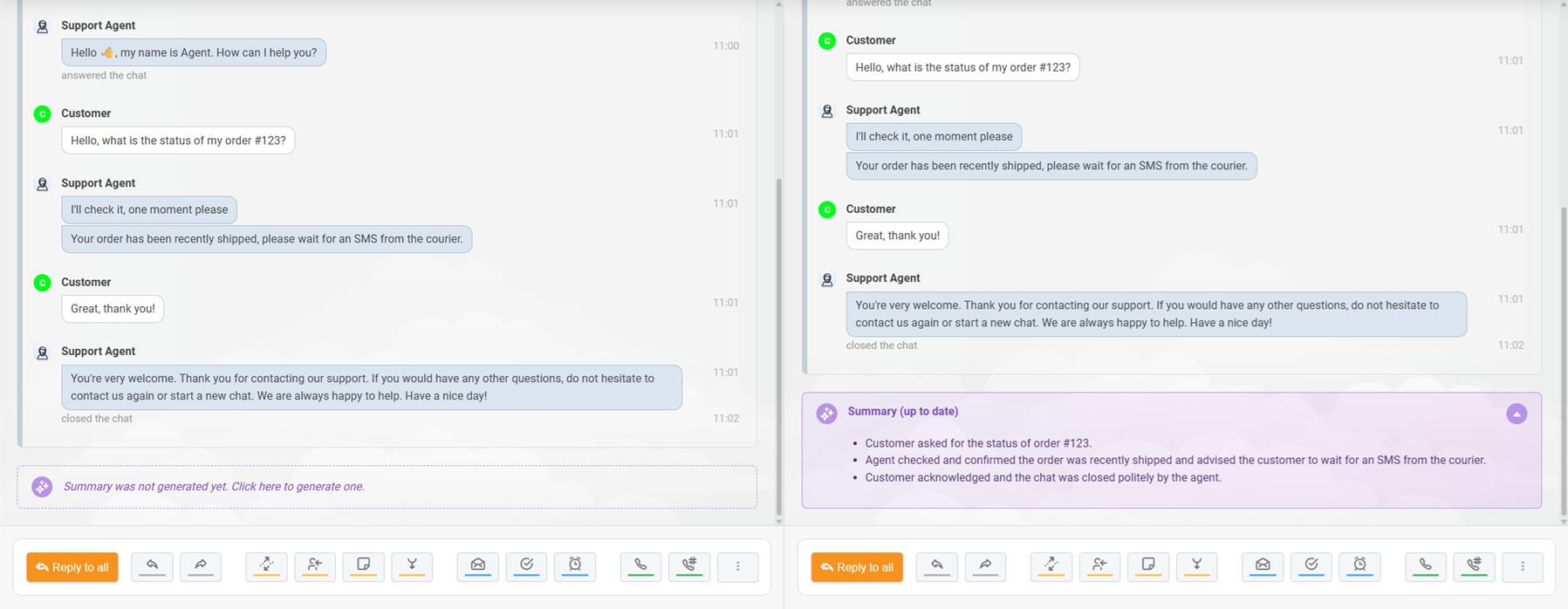
The simplest path to AI-generated internal notes is to enable the feature inside a help desk platform that already supports it. Many modern platforms now include ticket summarization as part of their AI toolset, and the setup typically requires just a few clicks.
Platforms like Zendesk, Freshdesk, and HubSpot Service Hub each offer their own implementation. Zendesk’s AI Copilot, for example, can summarize both public and internal ticket comments, giving agents a quick overview of the conversation history directly in the ticket view. Freshdesk’s Freddy AI includes a dedicated “Summarize” button that compiles the entire interaction into a structured overview.
The advantage of native features is that they require no integration work. The AI already has access to your ticket data, understands the structure of your help desk, and can write summaries directly into the internal notes field without any middleware.
Native AI features are convenient, but they are not always flexible. The summary format is predetermined by the platform, and you may not be able to customize which fields appear or how the information is structured. Some platforms also charge per-summary fees or gate AI features behind higher-tier plans.
For teams that want more control over the output format, or that need summaries to flow into external systems like Slack, Notion, or a knowledge base, a custom pipeline may be the better option.
If your help desk does not have native AI summarization, or if you want summaries that follow a specific internal format, you can build a custom pipeline using an automation platform and a large language model.
The basic architecture is straightforward. When a ticket reaches a certain status, typically “Resolved” or “Closed”, a webhook or automation trigger fires. The full conversation transcript is pulled from your help desk via API and sent to an LLM like OpenAI’s GPT-4o or Anthropic’s Claude. The LLM processes the conversation according to a prompt template you define, then returns a structured summary. The summary is written back to the ticket as an internal note.
Automation platforms like Zapier, Make, and Celigo can connect these steps without requiring custom code. For teams with engineering resources, a direct API integration between the help desk and the LLM provider offers more control and lower latency.
The quality of an AI-generated internal note depends heavily on the prompt. A vague instruction like “summarize this ticket” produces vague results. A structured prompt that specifies exactly which fields to extract, which format to use, and which information to ignore produces a note that agents can actually use.
Here is a prompt template that consistently produces useful internal notes:
“Analyze the following support ticket conversation. Generate an internal note with these sections: Issue (what the customer reported, in one sentence), Troubleshooting (what was tried and what worked), Decisions (any commitments or changes made), Status (resolved, pending, or escalated), and Next steps (what the next agent needs to know). Ignore greetings, signatures, and automated system messages. If something is unclear, mark it as ‘Needs clarification.’”
Support tickets that include automated system logs, think CI/CD pipeline notifications, monitoring alerts, or webhook payloads, create a unique challenge for AI summarization. The AI needs to recognize these entries as noise and exclude them from the summary.
This is typically handled through a preprocessing step. Before the conversation reaches the LLM, a lightweight filter strips out messages that match known patterns: sender names like “System,” “Webhook,” or “Automation”; content that contains raw JSON or stack traces; and messages flagged as automated in the ticket metadata.
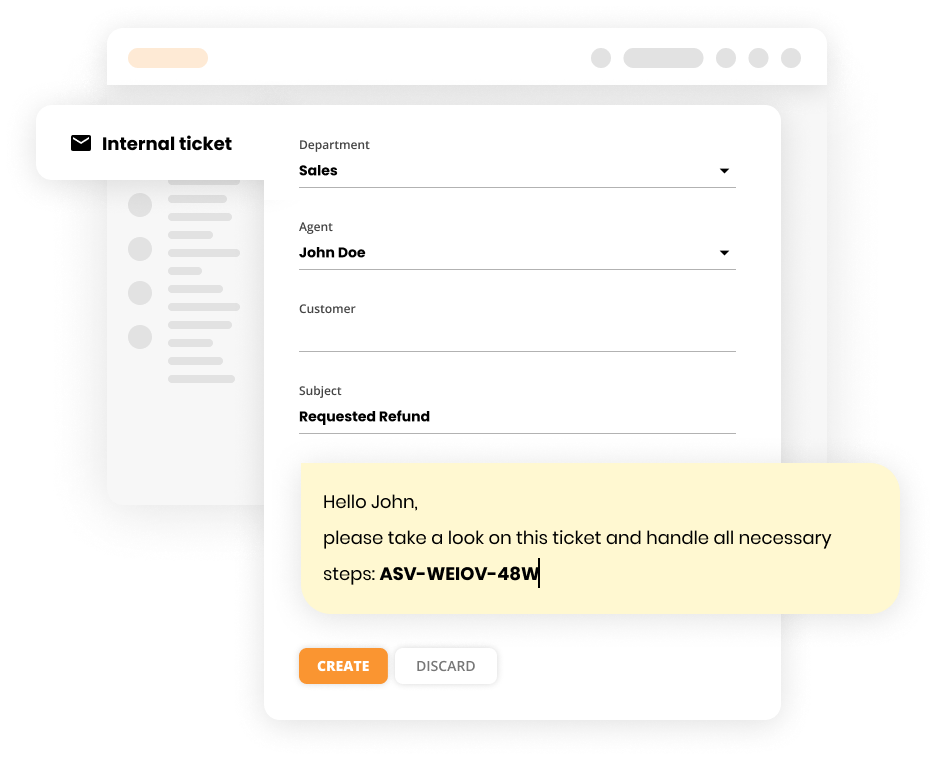
The LiveAgent ticketing system supports structured ticket data that makes this kind of filtering easier, since automated entries and human messages are already separated in the data model.

The latest tips and deals delivered straight to your inbox.
AI-generated internal notes are only as useful as the process that surrounds them. Teams that see the best results follow a few consistent practices.
Unstructured AI text is hard to scan. When every internal note follows the same format, with predictable headers like “Issue,” “Actions taken,” and “Next steps”, agents know exactly where to look. This consistency also makes it easier to search through old notes later, since the same information always appears in the same place.
AI summaries are a starting point, not a finished product. Especially during the initial rollout, agents should review AI-generated notes before they are finalized. Their feedback feeds back into the prompt, improving accuracy over time. Some teams run a two-week review period where every AI note gets a quick approval check. After that, the review process can be relaxed for routine tickets while keeping it in place for high-stakes ones.
AI trained on general conversation data tends to reproduce the politeness it sees in the training corpus. In internal notes, that is just noise. Prompt the AI to strip out greetings, expressions of gratitude, and other conversational filler. The note should contain only the information an agent needs to act: what went wrong, what was done about it, and what happens next.
Track a few concrete metrics to validate that AI-generated internal notes are working: time to resolution for tickets that involve handoffs, the number of repeat questions customers ask, and agent satisfaction scores. If these numbers improve, the AI is doing its job. If they do not, the prompt or the workflow needs adjustment.
LiveAgent’s AI ticket summary feature is designed to give agents instant context on any ticket, regardless of how long the conversation has been running. It works across all the channels that LiveAgent supports, email, live chat , call center transcripts, and social media messages, so agents get a unified summary even when the conversation spans multiple channels.
When an agent opens a ticket, the AI fetches the full conversation history, filters out system messages and irrelevant metadata, and generates a structured summary covering the Issue, the Resolution steps already taken, and any Open Items. The finished summary is posted automatically as an internal note within the ticket, so an agent joining mid-thread gets the full picture in seconds, without scrolling through every message.
The AI summary is posted directly into the ticket’s internal notes, so agents do not need to switch tools or trigger a separate process. For teams that handle high ticket volumes across multiple channels, this instant context cuts down the orientation time that eats into productive work.
Setting up AI ticket summary in LiveAgent requires minimal configuration. You can adjust the prompt to change the Issue, Resolution, and Open Items structure, as well as the tone and level of detail, to match how your team actually works. LiveAgent does not charge any additional fees for enabling the feature; usage is billed through FlowHunt’s credit-based pricing model, and the cost per ticket is generally low since each summary involves a single, focused generation task.
The feature is included as part of LiveAgent’s AI-powered help desk capabilities, which also include AI-assisted reply drafting, automated ticket routing, and proactive chat. For teams looking to reduce their total cost of support, bundling these AI features into a single platform can be more cost-effective than layering separate tools on top of a basic help desk.
Different teams need different levels of control over their AI summaries. The table below compares the three main approaches.
| Approach | Setup time | Customization | Best for |
|---|---|---|---|
| Native help desk AI (e.g., LiveAgent, Zendesk, Freshdesk) | Minutes | Low to moderate | Teams that want plug-and-play summarization without extra tools |
| No-code automation (Zapier, Make + LLM) | Hours | High | Teams that need custom summary formats or multi-system integration |
| Custom API integration (direct LLM access) | Days to weeks | Maximum | Engineering teams that need full control over the pipeline |
For most support teams, the native AI approach delivers the best balance of effort and value. The AI ticket summary feature in LiveAgent, for example, produces structured internal notes immediately after activation, with no workflow design or prompt engineering required.
If you are ready to bring AI into your internal documentation workflow, the path is shorter than you might expect. Start with these three steps.
Before turning on AI, spend a week reviewing the internal notes your team currently produces. Count how many tickets have no notes at all. Note how many notes are so brief they provide no useful context. This baseline gives you a clear before-and-after comparison once the AI is running.
If your help desk has a native AI feature, start there. Enable it on a small set of tickets first, let agents review the output, and refine the configuration based on their feedback. If you are using a platform like LiveAgent that bundles AI features into the help desk, you can activate AI ticket summary as part of the same onboarding process.
If your help desk lacks native AI, build a quick prototype with Zapier or Make. Connect your ticket system to an LLM, test the prompt on a few real tickets, and iterate until the output is consistently useful.
After the AI has been running for a few weeks, compare your metrics against the baseline. Look at agent feedback, handoff speed, and ticket resolution times. Use what you learn to adjust the prompt, the workflow, or the review process.
The goal is not perfection on day one. It is a steady improvement in the quality and consistency of your internal documentation, and a support team that spends less time reading and more time solving.
The support team’s oldest complaint, “nobody wrote down what happened”, finally has a real fix. AI reads the same conversation a human agent would read, but it does it in seconds, without fatigue, and without skipping the details that matter for the next handoff.
Whether you enable a native feature like LiveAgent’s AI ticket summary , build a custom pipeline with an automation platform, or go all the way to a direct API integration, the underlying goal is the same: turn every resolved conversation into a structured, searchable record instead of a wall of text nobody has time to read. Start small, keep a human in the loop while you validate the output, and let the AI take over the documentation work that was always competing with actually helping customers.
Share this article
LiveAgent's AI Ticket Summary feature instantly turns long, complex support conversations into clear, structured summaries agents can read in seconds.
Integrate AI into your helpdesk for faster responses, automated replies, and improved customer satisfaction. See benefits & best practices!

Discover how AI tools automate, enhance, and speed up support ticket responses—boosting customer satisfaction and agent efficiency.
Cookie Consent
We use cookies to enhance your browsing experience and analyze our traffic. See our privacy policy.