




What is IVR?
IVR stands for interactive voice response. An IVR is an automated phone system that greets callers, lets them choose menu options by pressing keys or speaking, and then answers the question or routes the call to the right agent or department.
In this article:
- What is the IVR meaning in customer service?
- How does an IVR system work?
- What are the types of IVR?
- What does an IVR call flow look like?
- What are common IVR examples?
- What are the benefits and limits of IVR?
- Is AI IVR different from a classic IVR?
- How does IVR work in LiveAgent?
What is the IVR meaning in customer service?
The IVR meaning in customer service is simple: IVR stands for interactive voice response, the automated voice that answers your call and asks you to choose an option, so you reach the right person or get a quick answer without waiting for an agent.
On this page, IVR always means the phone system used by call centers and support teams.
One of the most famous early uses was Moviefone in the 1990s, where callers entered a postal code to hear nearby movie times (IBM, interactive voice response ). The same idea is behind the menu you hear when you call many companies today.
How does an IVR system work?
An IVR system answers the call, plays a menu, takes the caller’s input and then acts on it. The input comes from the keypad or from speech. The action can be a recorded answer, a data lookup, a callback, a voicemail or a transfer to an agent.
The steps in a typical call:
- The call arrives. The caller dials your number, and the system answers right away.
- A greeting and a menu play. For example, “For sales, press 1. For support, press 2.”
- The caller answers. They press a key or say a word.
- The system acts. It plays information, asks another question, offers a callback or checks an account.
- The call ends or moves on. The caller hangs up with an answer, or the system passes the call to the right agent, department or voicemail.
Keypad input works through DTMF signals. Amazon Web Services describes them as the two simultaneous low and high frequency tones that every number on a telephone keypad emits (AWS, what is IVR ). The IVR reads those tones to know which key was pressed.
An IVR is usually one part of a larger phone setup. Call routing sends the call on, and automatic call distribution picks the agent. Our short guide to call center technology shows how these parts fit together.
What are the types of IVR?
The idea stays the same across types, but there are three common kinds, and they differ in how the caller answers. Touch-tone systems use the keypad. Directed dialog systems accept a few spoken answers. Natural language systems understand free speech. AWS and IBM both list these three types.
| Type | How the caller answers | Good fit | Main weakness |
|---|---|---|---|
| Touch-tone (keypad) | Presses a number | Simple menus, noisy places | Long menus are slow and easy to forget |
| Directed dialog | Says one of the options out loud, such as “billing” | Short, clear choices | Fails on words the system does not expect |
| Natural language | Describes the problem in their own words | Many possible reasons for calling | Needs more setup and testing, and mistakes are more visible |
For most small and mid-size teams, a keypad IVR is the right place to start. It is predictable and easy to fix. You can move to speech later if your callers struggle with the menu.
What does an IVR call flow look like?
An IVR call flow is the map of every path a caller can take, from the greeting to the final action. Each menu choice is a branch, and each branch ends in an answer, an agent, a callback or a voicemail. Drawing it on paper before you build it saves a lot of rework.
Here is a simple example with two departments, written as a flow (an illustration, not a real customer setup):
| Step | What the caller hears | Result |
|---|---|---|
| Greeting | “Hello, you’ve reached [Company Name]. Please choose from the following options.” | Menu plays |
| Press 1 | “Connecting you to Sales.” | Rings the sales team; if nobody is online, the caller can leave a voicemail |
| Press 2 | “Connecting you to technical support.” | Rings the support team; if nobody is online, the caller can leave a voicemail |
| No key pressed | The menu repeats once | Then it routes to a default team |
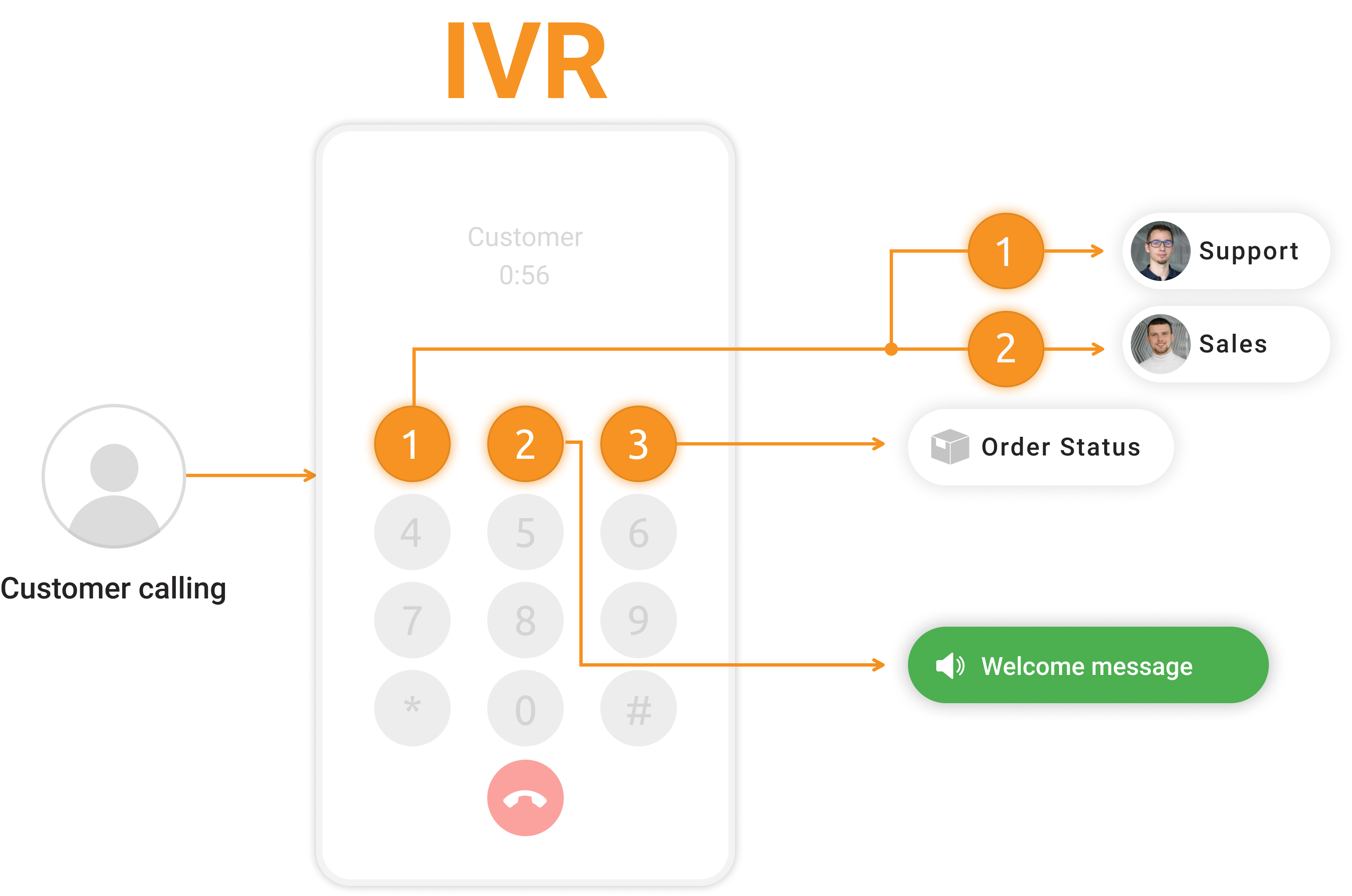
Three rules keep a call flow healthy. Put the most common reason first, keep every branch to a few steps, and give callers a way to reach a person from any menu. Our free IVR script templates give you ready greetings and menu wording to start from.

Join our newsletter
The latest tips and deals delivered straight to your inbox.
What are common IVR examples?
The easiest way to see how IVR works in practice is to look at what it does on a call. The most common IVR examples are department routing, after-hours messages, callback offers and self-service lookups. Each one removes a step that an agent would otherwise do by hand. The examples below are typical uses, not a list of what any single vendor offers.
- Department routing. “Press 1 for sales, press 2 for support” sends the caller to the right team the first time, so fewer calls need a transfer.
- After-hours handling. Outside working hours, the IVR plays your opening times and offers voicemail instead of ringing out.
- Callback requests. When the line is busy, the caller can ask for a call back instead of staying on hold. See our guide to the customer service callback .
- Self-service lookups. The caller enters an order or account number and hears the status. This needs a link between the IVR and your data.
- Language choice. The first menu asks for a language, and the call goes to a matching queue or recording.
What are the benefits and limits of IVR?
For a support team, IVR comes down to time saved and calls sorted. A badly designed IVR does the opposite and frustrates callers. The benefits only appear when the menu is short and a human is easy to reach. Judge any IVR by whether callers get what they need quickly, not by how many calls it handles.
| Benefits | Limits |
|---|---|
| Routes callers to the right team without a manual transfer | Long menus make callers hang up or press 0 |
| Handles simple questions at any hour | Callers with complex problems feel stuck |
| Gives agents the caller’s reason before they pick up | Speech menus can misunderstand accents or noise |
| Cuts the wait with callback and voicemail options | A menu that is not updated sends callers to the wrong place |
| Records call data you can review later | Needs regular testing as your services change |
Our advice for a new IVR: start with one short menu, listen to ten real calls after launch, and change whatever confuses people first. AWS also lists better first-contact resolution and lower costs from after-hours service as benefits, but those results depend on how well the menu is built for your callers.
Is AI IVR different from a classic IVR?
Yes. A classic IVR follows a fixed menu that you design, while an AI IVR uses speech recognition and a language model to understand what the caller says and respond in a more natural way. The classic version is predictable, and the AI version is more flexible but needs more testing.
Before you switch to an AI IVR, check three things: how the system hands over to a person, how it behaves when it does not understand, and what it costs per minute. A good first step is to keep your keypad menu and add speech only for the calls that need it.
How does IVR work in LiveAgent?
LiveAgent is our product; this page covers what IVR is first and then our version of it. LiveAgent has an IVR feature with an online designer where you build your IVR tree, even without technical skills. You can record the audio messages in the designer or upload files you already have.
What the LiveAgent IVR can do:
- Route callers to the correct department or agent.
- Offer an automatic callback instead of waiting on hold.
- Prioritize urgent calls.
- Play your own recorded or uploaded messages, and send callers to voicemail when nobody is online.
The IVR is part of LiveAgent’s call center software , next to call routing, call transfers and call recordings. To see the full setup from connecting a number to a test call, read our call center setup guide .
Your next step
Now that you know what IVR is, write down the three most common reasons people call you, and turn them into a menu of three options with a way to reach a person. Then use our IVR script templates for the wording, and build the flow in your call center software.