Welcome to the LiveAgent October 2026 product update. Last month, AI agents learned to reply on WhatsApp . Now AI email reply is here, so they can answer emails too. Your chatbot also gets a lot smarter about the conversation it is in, and your own AI assistant can sign in to LiveAgent without any copying and pasting.
Here is everything new, in plain language.
- October 2026 update at a glance
- AI email reply: agents answer tickets
- Chatbot ticket IDs
- OAuth for ChatGPT, Gemini, and Claude Code
- Searchable call transcripts
- New AI models
- Coming next
October 2026 update at a glance
Five changes shipped this month. Here is what each one does and what it asks of you.
| What is new | Who will feel it | What you need to do |
|---|---|---|
| AI agents reply by email | Email support teams | Add the Reply via email tool to your AI agent |
| Chatbot knows its ticket | Chat teams, FlowHunt flow builders | Add MCP tools operating with ticket into your chatbot’s flow |
| OAuth sign-in for ChatGPT, Gemini, and Claude Code | Anyone connecting a personal AI assistant | Sign in with OAuth when you connect |
| Searchable call transcripts | Phone teams, team leads | Nothing, if call transcription is on |
| New OpenAI and Gemini models | Anyone using those AI providers | Choose a model from the list |
AI email reply: agents answer tickets
Email joins WhatsApp as a channel where your AI agents can reply without a person typing.
With the new Reply via email tool, added to our MCP server in version 5.69, an AI agent writes the answer and sends it straight to the customer. It works like the Reply and Reply to all buttons you already know:
- Everyone on the thread gets the answer. The reply goes to the people the customer chose to include, so nobody is left out.
- Recipients can be adjusted. If needed, the AI agent can change the To and Cc recipients of its reply.
- Closed tickets stay closed. The AI agent will not reply on tickets that are closed or deleted.
Reply via email is a new MCP tool, so to use it you add it to your AI agent. That can be an AI agent inside LiveAgent or a personal AI agent such as Claude on your computer. If you are new to AI agents, our AI features page explains what they can do, and email management shows where email tickets fit into your inbox.
Chatbot ticket IDs
When a visitor starts a chat, LiveAgent now tells your chatbot which ticket that chat belongs to. That small detail lets the chatbot act on the ticket instead of only talking about it.
Now your chatbot can work with that ticket directly. It can:
- add notes to the ticket,
- tag the ticket based on what the visitor is asking about,
- check the customer’s details and custom fields, and answer with them in mind,
- reopen the ticket when the chat ends (combined with rules ), so a person can follow up.
In your FlowHunt flow, the ticket ID is available as a flow variable. It has been live since version 5.67, and it lets your AI use LiveAgent’s other MCP tools on that ticket.
OAuth for ChatGPT, Gemini, and Claude Code
You can now connect ChatGPT, Google Gemini, and Claude Code to your LiveAgent account by signing in with OAuth. OAuth is the familiar “sign in and approve” screen, so you never have to handle a secret key yourself.
From version 5.69, OAuth authorization is supported for these assistants too. Once connected, you can ask your personal AI assistant to work with your tickets in plain language:
- “Summarize the tickets assigned to me that are still open.”
- “Find the ticket about the missing invoice and tag it Billing.”
- “Reply to that customer by email and thank them for waiting.”
Your assistant works with your own permissions, so it can only see and do what you can in LiveAgent.

Join our newsletter
The latest tips and deals delivered straight to your inbox.
Searchable call transcripts
Call transcripts are now searchable in version 5.69. Type something a customer said on the phone into the ticket search bar, and the ticket with that call comes up.
This helps when:
- a customer calls back and says “I already told you about this last week”,
- a team lead wants to find every call where a refund was mentioned,
- you remember the conversation, but not who it was with.
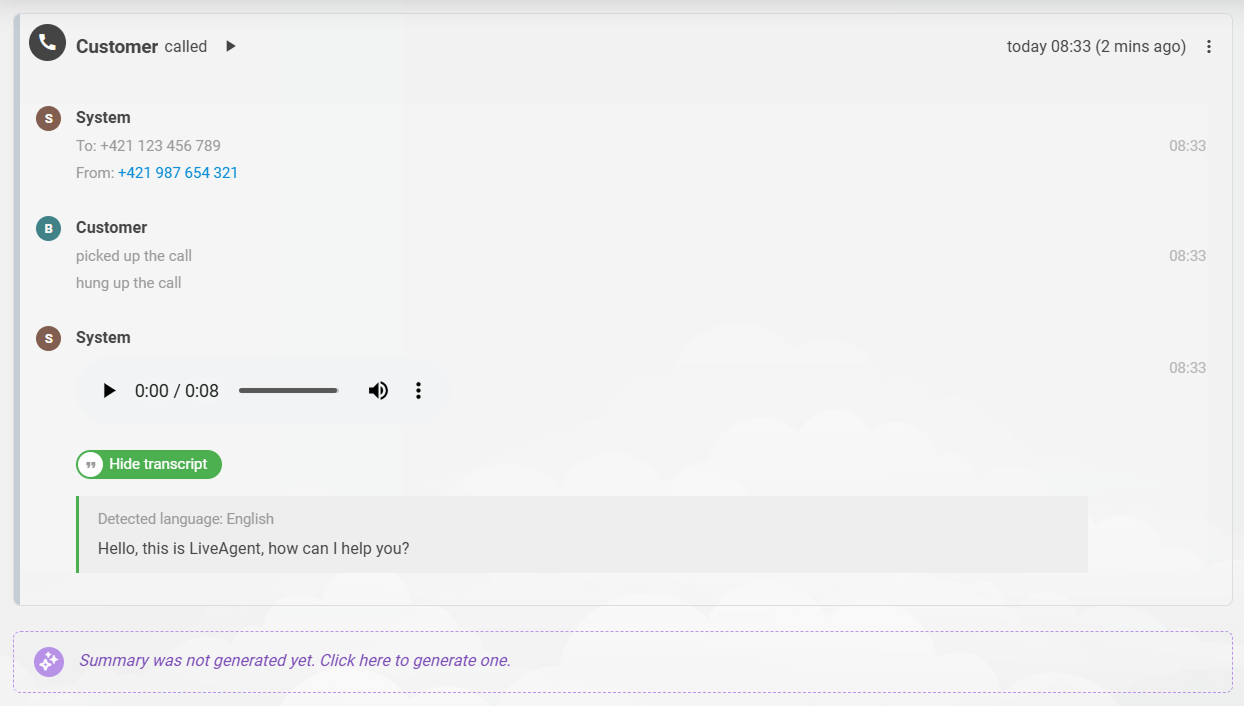
There is nothing new to set up. If call transcription is switched on in Configuration > Calls > Settings, each call becomes searchable as soon as its transcript is ready. When you delete a ticket, its transcript leaves the search results with it.
New AI models
We have added the newest models from OpenAI and Google in version 5.68. OpenAI users can now pick GPT 6 Astra, GPT 6 Sol, and GPT 6 Luna , with GPT 6.1 Sol coming soon. Gemini users get Gemini 3.7 Flash and Gemini 3.8 Flash. Accounts are updating now, so every account should have them next week.
If you use Anthropic as your AI provider, Claude Opus 5, Claude Sonnet 5.5, and Claude Opus 5.5 are already available to everyone.
Coming next
Our team is already working on the next round of updates:
- Instagram direct messages
- A full rebuild of the AI chatbot
- Automatic message translation
- Improved call transcription
Thank you to every customer who sends us bug reports and feature requests. They shape what we build next.
If you only do one thing today, add the Reply via email tool to your AI agent. Want to get more out of the features you already pay for? Our academy walks through the rest.