


Call Transcription Software for Customer Support
LiveAgent's call transcription turns recorded calls into text automatically, right in the ticket timeline. No replaying calls to check what was said.
9 min read
Call Center
AI
+2
Version 5.68 reads your calls back to you as text, brings Claude and Gemini on board, gives your chatbot real buttons, and lets AI agents reply on WhatsApp.
Welcome to the September edition of LiveAgent updates. This month is a big one for anyone who works with the phone, and a good one for anyone who leans on AI. If you missed the August edition , AI agents landed then, and this month they learn some new tricks.
Here is everything new, in plain language.
Six changes shipped this month. Here is what each one does and what it asks of you.
| What is new | Who will feel it | What you need to do |
|---|---|---|
| Call transcription | Phone teams, quality reviewers | Turn it on: Configuration > Calls > Settings |
| Anthropic Claude and Google Gemini added | Anyone using AI features | Pick your provider when you set up AI agents or the AI Answer Assistant |
| Newest GPT models added | Anyone using OpenAI | Choose a model from the refreshed list |
| Chatbot answer buttons | Website visitors, chat teams | Add the Button widget in your FlowHunt flow |
| AI agents can reply on WhatsApp | WhatsApp teams | Set a rule that starts an AI agent |
| Export permission for CSV files | Managers, admins | Nothing, unless you want to remove it from a role |
The biggest release this month is call transcription. From version 5.68, LiveAgent can turn a recorded call into text on its own, and your agents do not have to lift a finger for it.
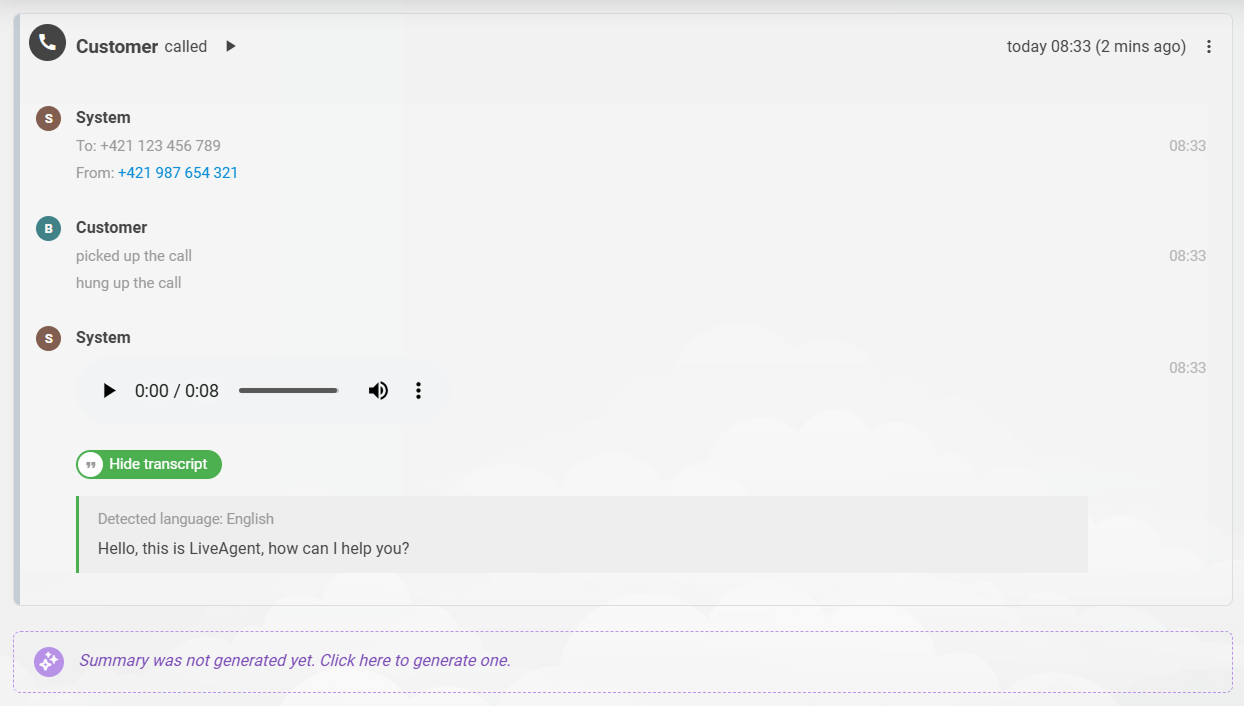
Here is how it works. A call ends, the recording is saved, and call transcription quietly starts in the background. The finished text then appears in the ticket timeline, right under the audio player.
This changes a small daily annoyance. Checking what was said on a call used to mean listening to it again, sometimes twice, sometimes at 1.5x speed while taking notes. Now you read it.
Call transcription helps most in three places:
Two things to know before you switch it on. The feature needs an OpenAI provider set up in your account. And when you enable it, you are confirming that recording and transcribing your calls follows the caller-consent rules that apply to you, so check that first if you are not sure.
If your call center handles more than a handful of calls a day, this is the setting to turn on first. It sits in your call recordings settings under Configuration > Calls > Settings.
Version 5.68 adds two new AI providers: Anthropic Claude and Google Gemini . They join OpenAI and FlowHunt, so you now have four to choose from.
An AI provider is simply the company whose AI model does the thinking behind the scenes. Both new providers work with our AI features , including AI agents and the AI Answer Assistant.
Why would you switch? Usually for one of three reasons. Your company already has a preferred vendor. You have a compliance requirement that points to one of them. Or you would simply rather not depend on a single AI company for everything.
We also refreshed the OpenAI model list. The recently released GPT 5.6 Sol, Terra, and Luna models are now available, so you can reach for a heavyweight model on demanding work, or a lighter one when speed and cost matter more.
If you build your chatbot flows in FlowHunt, our no-code AI automation software, its Button widget now renders properly in the chat window.
Answer options show up as real, clickable buttons. A visitor taps one, and their choice goes straight back to the bot as a reply. No typing, no guessing what to write, no spelling mistakes to confuse the bot.
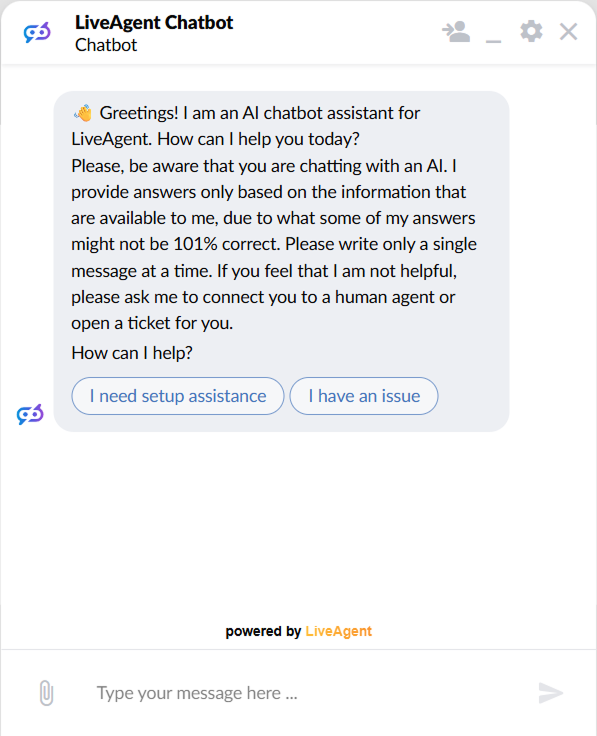
It is a small change that makes a chatbot feel far less like a form and far more like a conversation.

The latest tips and deals delivered straight to your inbox.
Until now, rules could send an automatic reply by email, but WhatsApp tickets had no way to get an automatic reply of any kind. Version 5.68 closes that gap.
AI agents can now send real, customer-visible replies in WhatsApp tickets, and not just an opening greeting. The rule action that starts an AI agent already existed, so a WhatsApp ticket can now get handled, from the first message onward, without anyone touching it.
Replying is only part of what an AI agent can do, though. The same agent might read the conversation, search your knowledge sources, tag the ticket, transfer it, and resolve it once the matter is settled.
There is a neat side effect here. Replies take only a moment, so they land inside WhatsApp’s 24-hour customer service window and stay within Meta’s rules by design, rather than by luck.
AI agents picked up two more skills this month: they can mark a ticket as spam, and they can take that mark back off.
Handling spam automatically used to be a two-step workaround. An agent added a Spam tag, then you built a rule to catch everything carrying that tag and mark it as spam. AI agents now just do the job themselves, in a single run, with no tag and no follow-up rule in between.
Exporting contacts, companies, or tickets to CSV used to be all or nothing. Anyone who could reach the button could pull the whole list.
The new version adds proper permissions for contact and ticket exports, and you can add or remove them from your agent custom roles. Agents without the permission will not see the Export button at all.
Nothing changes on your account unless you want it to. Every custom role that could export tickets before keeps the permission switched on, so this is a door you can now close, not one that closed on you.
As always, our warmest thanks go to every customer who reports a bug, files a request, or simply tells us what is slowing them down. Several of this month’s releases started life as exactly that kind of message, and we have not forgotten the rest.
Behind the scenes our teams are already deep into the next round. Keep an eye out for Instagram direct messages support, on-demand translation of messages, and plenty more.
If you only do one thing today, switch on call transcription and read your next call instead of replaying it. Want to get more out of the features you already pay for? Our academy walks through the rest.
Share this article
Adam is the Organic Growth Strategist at LiveAgent. He is genuinely excited about what AI agents can take off a support team's plate, and equally suspicious of any automation that makes the customer work harder to be understood.

LiveAgent's call transcription turns recorded calls into text automatically, right in the ticket timeline. No replaying calls to check what was said.
Discover LiveAgent's August updates: new AI Answer Generator, redesigned attachments, bug fixes & a call app in development. Learn more!
Explore LiveAgent's May 2026 updates, featuring AI Agents, AI Work features, LiveAgent MCP Integration, and more.