Learn to create a self-service knowledge base with LiveAgent’s templates, including guides, FAQs, and tutorials. Discover how to write effective knowledge base articles and use templates like FAQ, how-to, troubleshooting, and more.
As today’s digital-savvy, connected consumers expect and demand easy access to accurate information about the products and services they use, having a comprehensive self-service knowledge base is no longer ’nice-to-have’ but a must-have. In fact, Microsoft’s research
revealed that 90% of global consumers expect brands and organizations to offer an online portal for self-service. Moreover, according to Forrester’s survey
, customers prefer knowledge bases over all other self-service channels. Below is a simple guide to writing various types of knowledge base articles along with some basic knowledge base article templates you can use to get started.
What is a knowledge base?
A knowledge base is an online self-service library containing articles and detailed information about a specific company, its products, or services. It can include a FAQ section, how-to articles, troubleshooting tips, user guides, and video tutorials – anything that helps customers and prospects find answers to their questions and resolve product or service issues on their own (without involving customer service).
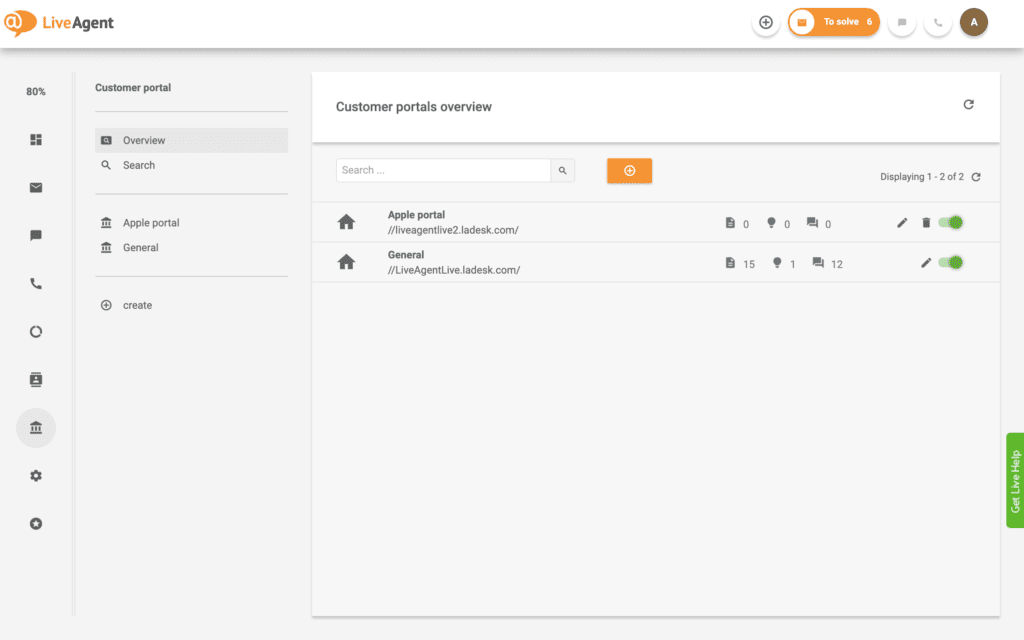
LiveAgent gives you the option of building multiple knowledge bases, both internal and external
A knowledge base can provide valuable data for customers, prospects, and even employees. When used externally, a knowledge base is where customers and prospects can go to learn everything they’d ever need to know about a company’s products or services. Building knowledge base internally helps distribute all company information among its employees.
Join our newsletter
The latest tips and deals delivered straight to your inbox.
5 Steps to write an efficient knowledge base article
To ensure your knowledge base is straight to the point, easily readable, informative, and highly relevant, each knowledge base article should be:
Targeted: stick to one topic per article to avoid user confusion.
User-focused: only write about what your specific audience needs help with.
Comprehensive: include concise, fully-detailed, all-encompassing information.
Well-structured: keep a simple, standardized structure for easy readability.
Well-written: use clear, plain language that is understandable for non-tech users.
Visually appealing: add visual content to make it easier for users to digest information.
Follow these simple steps for writing effective articles for your knowledge base:
Choose the right title
It’s critical to create a title that clearly states what task or problem the article deals with. It’s best to use titles based on actions or user expectations. So, keep them short and search-friendly by including specific keywords, and avoid using technical terms that aren’t necessary. Here are some of the most common knowledge base article titles you can use:
‘Getting Started with …"
“New User Guide”
“A Guide to …”
“Intro to …”
“How to Set up Your …”
“How to Fix …”
“Managing Your Account”
“Installing Your …”
Keep a unified structure
Though the structure may vary based on the article type, a typical knowledge base article would include a short intro, description of the problem (if applicable), outlining the steps to accomplish the task, summarizing the outcome and listing related links. Longer articles may have a table of contents to help readers find the sections they are interested in and skip any unnecessary information.
Easy to read formatting
When it comes to formatting your knowledge base articles, simplicity is key. To make your text easily scannable, you may consider:
Breaking longer articles into short paragraphs with different headings and subheadings;
Including a table of contents with anchor links so users can jump straight to the section that is most relevant to them;
Using bullet points and numbered lists to break up blocks of text and make it more readable;
Using bold, italicized, or highlighted text to draw the reader’s attention to key pieces of information.
Add visuals
If you are walking your users through a step by step guide, you can make your instructions more clear by including screenshots, GIFs, videos, or whatever else may help your readers digest the content easier. In fact, when writing task-oriented copy, visuals are a must as they enrich your support content and help to keep users engaged.
Include further reading suggestions
Offer related links for further reading at the end of the article to help readers discover more helpful information. This is especially important when users are likely to want to learn more about a related topic, or when your article covers only one aspect of a larger set of tasks.
“Related Articles”
“Further Reading”
“Related Links”
“You may also like”
Knowledge base article templates
Still unsure? No worries, we have created a couple of knowledge base article templates to help you out right away!
FAQ template
Frequently asked questions are an important part of any knowledge base. To save the time of customers and customer service reps, these common FAQ questions are usually included in a knowledge base.
Title: Frequently Asked Questions
Table of contents:
Section 1 (e.g. General Questions)
Section 2 (e.g. Features)
Section 3 (e.g. Billing Questions)
Structure:
Section 1 (e.g. General Questions)
Question 1 (e.g. What is Company’s Product X?)
Answer 1
Question 2 (e.g. What are the benefits of Product X?)
Answer 2
Etc.
Section 2 (e.g. Features)
Question 1 (e.g. What features are included in the BASIC, PREMIUM, and PRO plans?)
Answer 1
Question 2 (e.g. What features does the trial include?)
Answer 2
Etc.
Section 3 (e.g. Billing Questions)
Question 1 (e.g. What is the monthly fee?)
Answer 1
Question 2 (e.g. How do I upgrade/ downgrade my subscription plan?)
Answer 2
Etc.
How-to knowledge base article template
How-to articles help users solve problems they have with your products or services. The articles are typically brief but very specific and provide a simple step-by-step guide to performing a certain task.
Title: How to [Name of Task]
Task: [Brief description of a task to be completed]
(e.g. ‘By following the instructions, you’ll be able to …’
“This article will help you set up your …”
“The following guide will provide you with instructions on how to install …”)
Prerequisites (if applicable): [Brief description of which products/features/customers the task does/doesn’t apply to]
Instructions:
[Step 1]
[Step 2]
[Step 3]
[Etc.]
Outcome: [Brief description of what should be possible once the task is completed]
Further Reading:
Related articles with links
Troubleshooting article template
Troubleshooting articles are supposed to help users resolve more complex issues they may have with your products or services. They’re very similar to how-to articles, however, they focus on providing solutions when things go wrong, as opposed to educating users on how to complete a task or how to get the most out of a particular product feature.
Title: [Problem name]
Problem: [Brief description of the problem to be addressed]
Outcome: [Brief description of how to confirm the problem is solved]
Alternatives: [Explaining the next steps if the problem isn’t solved]
(e.g. ‘If none of these actions work, please call our customer support at (number) or start a live chat."
“If none of the described steps helped, please send us an email at (email) or call our tech support at (number).”)
Further Reading:
Related articles with links
Tool description template
Tool description articles give a short description of what a specific product/ service is. Rather than answering questions or laying out step-by-step instructions, they tell readers exactly how the product/ service works. Furthermore, they may also include some information about the features and benefits of the tool and explain why it’s worth purchasing.
Title: [Product/ Service]
[Brief introduction of tool]
[Description of tool]
[Final tips/Additional information to note about the tool]
Further Reading: Related articles with links
User guide template
User guides or user manuals are typically long, detailed, comprehensive articles that provide an entire product or service description. They include complete information on using every single feature to give users a well-rounded education on the product or service. Most user guides contain both a written guide and associated images (screenshots, diagrams, etc.).
Tutorials are very similar to how-to articles with step-by-step instructions, however, they provide more in-depth information and don’t always contain steps in chronological order. Moreover, the tutorial can include a structured, complete explanation of what users can do with a specific product, service, or feature along with related visuals (screenshots, videos, etc.)
A knowledge base is an essential tool for customer service and support. It provides customers with searchable knowledge/information of solutions to common problems.
Determine your knowledge base's purpose and audience. Choose a structure, often beginning with a clear title, followed by an introduction, main content, and conclusion. Incorporate essential elements like links, images, or diagrams for clarity. Maintain consistent branding and language for a cohesive look and feel. Utilize tools suitable for your organization, such as word processors or content management systems, to design the template. After creating, test your template by drafting a few articles, refine based on feedback, and then share with your team along with guidelines on its usage.
A knowledge base article should be accurate, informative, and easy to understand. To achieve this, you need to identify the specific topic that will be address, conduct research, gather relevant information, and consult with experts if needed. Next, outline the structure, consider the main points, and organize the information for easy navigation. Use clear and concise language, avoid jargon or technical terms, and provide examples or visuals to clarify complex concepts.
There are several ways to categorize knowledge base articles, including by topic, type of content, audience, and level of expertise. For example, articles can be categorized based on the specific subject matter, such as 'technology,' 'finance,' or 'healthcare.' They can also be categorized based on the type of content, such as 'how-to guides,' 'troubleshooting tips,' or 'video tutorials.' Each categorization approach serves a specific purpose and helps users access the information they need.
A knowledge base is a storehouse of knowledge with the purpose of providing answers to questions and solving problems.
You can use the following types of articles in your knowledge base: FAQ articles help answer common customer service questions. Tip articles provide a quick tip for dealing with a frequent customer service issue. How-to articles provide step-by-step instructions for performing a specific task. Warning articles alert customers to potential dangers and problems.
Ready to put our knowledge base article templates to use?
How to create a knowledge base in 6 easy steps (+ Examples)
Learn to create a knowledge base in 6 steps: choose the right software, organize content, and improve articles. Avoid common errors, enhance customer service, a...
Create a customizable knowledge base for your customers with LiveAgent. Enjoy self-service portals, articles, forums, and feedback boards. Personalize themes, a...