



Integrately
Integrately connects over 600 apps to automate workflows, enhancing efficiency and saving time. Integrate LiveAgent with email marketing, billing, CRM, etc., to...
4 min read



NetCrunch is a network monitoring tool for IT teams, integrating with LiveAgent to alert and track issues via tickets. It offers seamless monitoring, with options for WebHooks and HTTP requests for two-way integration. Available in Small, Medium, and Large sizes.
NetCrunch is a network monitoring system designed for IT teams of businesses that have necessary links with the digital world. This software lets you monitor all the key operations related to your network to help identify glitches as well as performance improvement options.
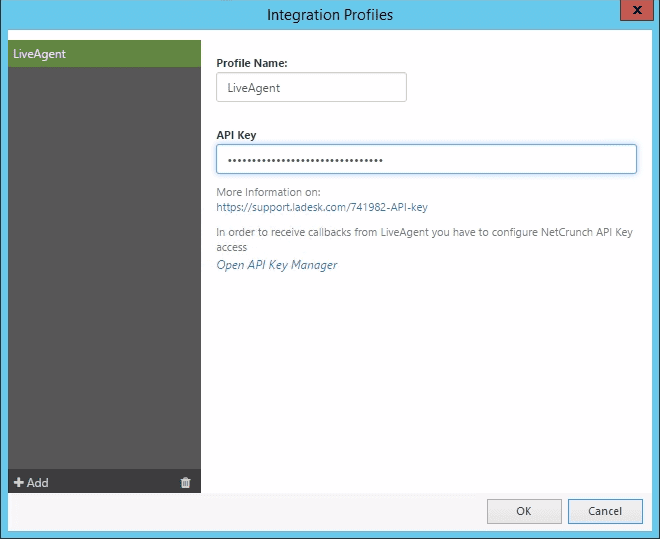
You can enable NetCrunch to post alerts as Tickets directly to your LiveAgent Helpdesk but first, you have to set up an Integration Profile for LiveAgent.
To allow NetCrunch to utilize the integration, it’s necessary to create an alerting script or editing the already existing one. Follow the steps below to learn how to create a new alerting script.
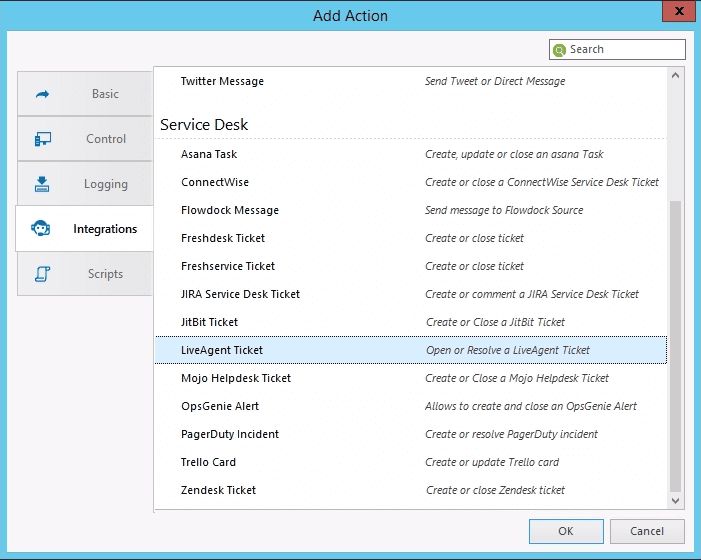

However, this will not work with the “Resolve Ticket” operation. To test the “Resolve Ticket” operation, you need to create an alerting script with an “Open Ticket” operation as Action to Run immediately and the “Close Ticket” operation as Action to Run on Alert Close. Then select a node and create an alert (for example Monitoring Disabled) to test and assign the alerting script to this alert. The following steps explain how to create a “Node Monitoring Disabled” alert for a single node.
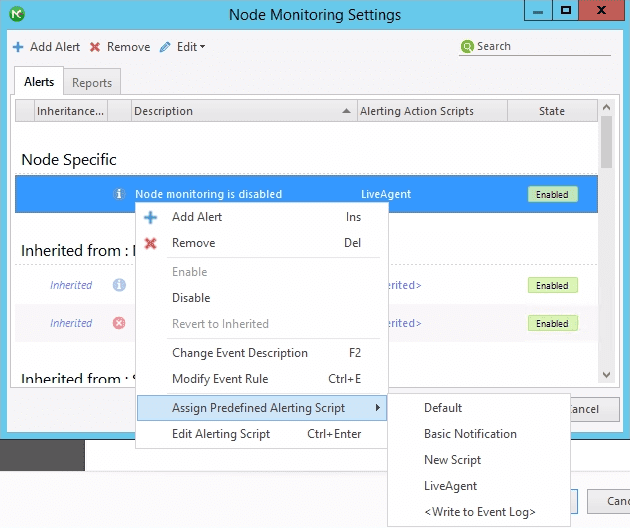
If you now trigger the alert (Disable the Node Monitoring), you will create a ticket. If this alert is closed (Node Monitoring Enabled) the ticket will be commented upon and resolved. After such an alerting script is attached to various alerts, NetCrunch will send messages to LiveAgent each time when the given alert is generated.

You can also send tickets to different Departments. It can be done by creating a new alerting script for each department without creating a new Integration Profile each time. Just make sure to name the scripts clearly for easier distinguishing later.
LiveAgent Helpdesk is one of our two-way integrations – it means that you can configure an HTTP Request that sends information back to NetCrunch when the ticket is resolved in LiveAgent so that the alert in NetCrunch is closed as well. This does not resolve the problem which caused the alert but it will close the alert generated by NetCrunch (i.e. Node is still down even though the alert is closed).
To be able to receive such a request from LiveAgent, you need to configure the NetCrunch API Key access. To do so, go to the LiveAgent Integration Profile and click “Open API Key Manager.” Copy the WebHook URL and replace the [Web_access_address] with your Web access address (i.e., https://123.456.789.0/ncinf/rest…).
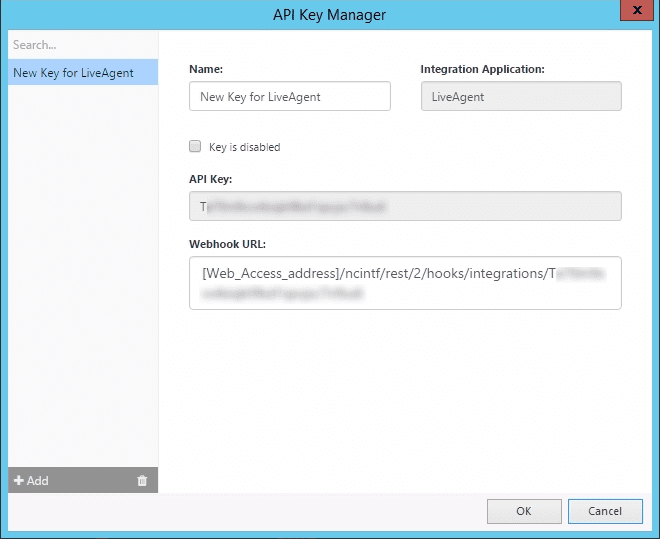
Go to LiveAgent, select Configuration > Automation > Rules and create a new rule . Give the rule a descriptive name and select Apply when “ticket status changed”. Now define the conditions similar to this:
IF ticket department is (i.e.) NetCrunch Department AND new status is Resolved.
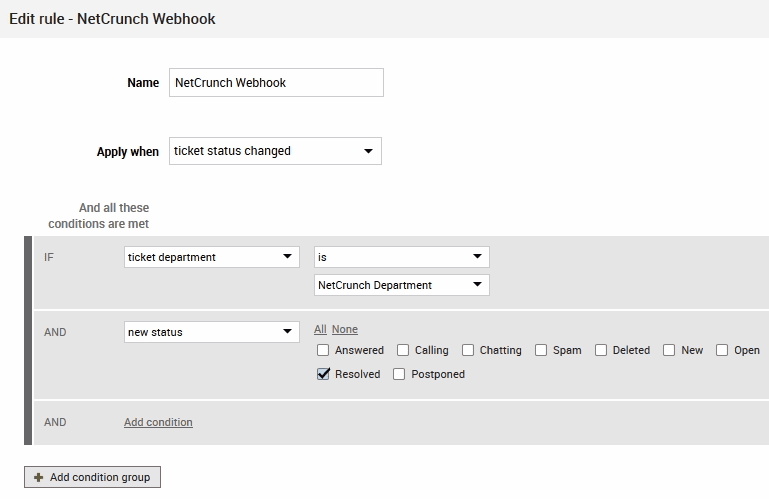
Now select the action “HTTP request” and add the URL with your replaced Web_Access_Address in the field for the URL. Select the HTTP Method “POST” and add the header “Content-Type:application/json”. Enter this to the HTTP Body to be sent as Data to NetCrunch:
{
  "ID": "{$conv_conversationid},
  "status": "{$conv_status},
  "subject": "{$conv_subject},
  "closedBy": "{$last_in_ticket_agent_lastname}, {$last_in_ticket_agent_firstname}"
}
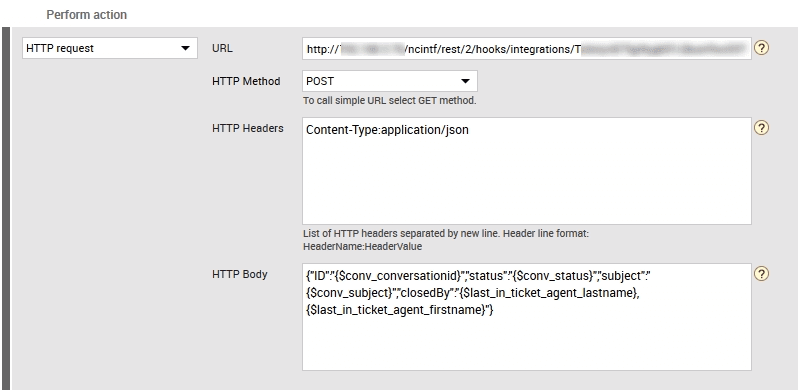
Save this Automation Rule. Now, when NetCrunch creates a ticket, and after LiveAgent Agent resolves it, the alert in NetCrunch will close. Please note that the problem may still exist, but the alert will be resolved in response to LiveAgent action.

No problem! LiveAgent offers a 30-day free trial where you can test the free NetCrunch integration!
Integrately connects over 600 apps to automate workflows, enhancing efficiency and saving time. Integrate LiveAgent with email marketing, billing, CRM, etc., to...
Discover why LiveAgent is the top HelpCrunch alternative—no setup fee, 24/7 customer service, and no credit card required. With over 175 features!
LiveAgent offers a free HelpCrunch migration that's fully executed by our technical support staff. Migrate your data from HelpCrunch today and provide better he...
Join our community of happy clients and provide excellent customer support with LiveAgent.
