Improve customer satisfaction with LiveAgent’s max queue length feature. Manage agent shifts, reduce wait times, and enhance efficiency. Start a 14-day free trial to save time and money while boosting customer experience.
Live Chat
Queue Management
Customer Service
Do you often experience an overload of customer inquiries? Are your customers often dissatisfied with customer service because of the waiting time?
Customer satisfaction has never been more important. Satisfied customers can become loyal customers, which is the ultimate goal. Even a factor, such as live chat waiting time can contribute to the overall satisfaction. If you do not pay attention, you can easily lose customers to your competitors.
Let’s face it. Nobody wants to wait in a line. Therefore, LiveAgent created a live chat feature called maximum queue length in order to improve customer satisfaction. Moreover, your company can easily manage agents’ shifts as well as their daily workflow.
Business benefits
Saves time - Reduce administrative overhead and focus on customer service
Efficient workflow - Manage agent capacity and prevent overload
Improved customer satisfaction - Set appropriate expectations and reduce frustration
Better CX - Create a positive customer experience even during busy periods
Saves money - Optimize resource allocation and reduce operational costs
How does it work?
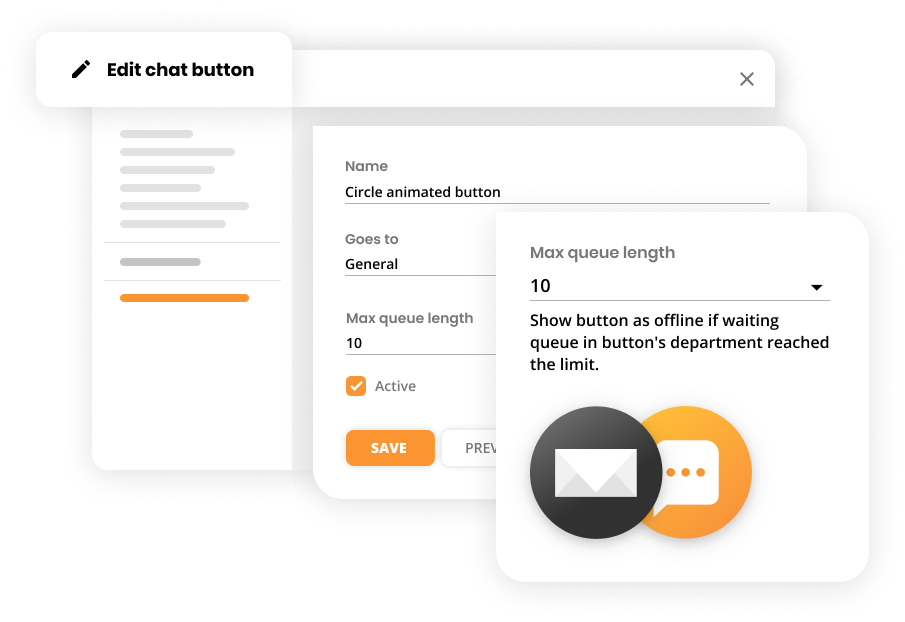
You can easily define the max queue limit in the live chat button settings.
When the queue limit is reached, the chat button automatically changes its availability to offline or is completely hidden from your website.
Naturally, when the queue is back in the limit, the live chat button appears again with the online status.
As we mentioned, the live chat has the ability to act as an offline button if there are too many visitors/customers waiting in the chat queue. This helps eliminate customer’s frustration when the chat queue is long.
If you set up an offline chat button, a pre-chat form is shown to the visitors. Therefore, they can still contact you by submitting their email address, which gives you the opportunity to contact them later. This creates appropriate expectations and saves time both for the company and the customers.
How to set up queue length in LiveAgent?
Setting up queue length in LiveAgent is a simple process that allows you to manage the maximum number of customers in your live chat queue. This feature ensures you can handle incoming inquiries efficiently and prevent long wait times, ultimately improving customer satisfaction.
Steps to set up queue length:
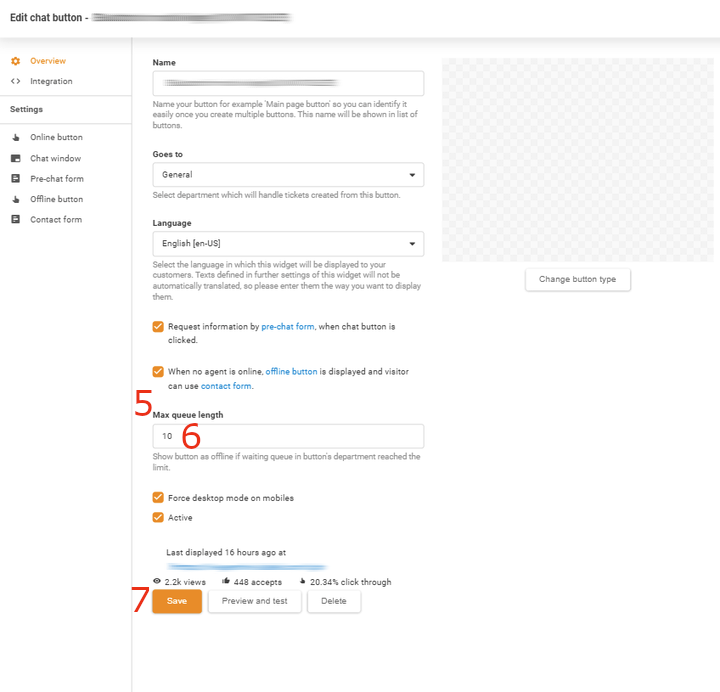
Log in to LiveAgent.
Go to the Configuration section by clicking the gear icon in the left-side menu.
Go to Chat settings
Locate the Chat Buttons option.
Create or select the specific Chat Button you want to adjust.
Scroll down to the Max Queue Length setting.
Enter the desired number of people that can be in the queue at one time. For example, if you set the max queue length to 10, the system will hide the chat button or show it as offline once 10 people are in the queue.
Click Save to apply the settings.
Bonus tips
Create multiple chat buttons
LiveAgent allows you to create online chat buttons for specific departments, such as your customer support and customer service. Moreover, you can set the online chat buttons for specific URLs. When creating them, you can define different max queue lengths for each button. Therefore, creating an effective workflow as well as providing a great customer experience.
If you would like to learn more, read LiveAgent – Live Chat.
Let the experienced agents handle the difficult chats
In order to save time and resources for your company and customer, you need to be efficient. Prevent customers from waiting too long in a queue. It is optimal to give some of your agents an option to transfer difficult chats to experienced agents. As a result, you can efficiently allocate the time of your agents and improve waiting time in a queue.
Use canned responses
If you decide to try LiveAgent, definitely utilize canned responses to improve the waiting time in a queue. It can save your agents a lot of time, especially with repetitive inquiries. However, use them wisely, do not abuse them. Try to personalize them. No one wants to talk to a robot.
If you would like to learn more, read LiveAgent – Canned responses.
Knowledge base resources
Would you like to know how to set up a live chat button for your website? Read about how you can easily create a chat button in LiveAgent.
Want to set up a waiting time in LiveAgent? Here is a step-by-step guide to set up a max queue length in LiveAgent.
Frequently asked questions
Max queue length is a LiveAgent feature that allows you to set a maximum number of customers that can be waiting in your live chat queue at any given time. When the limit is reached, the chat button automatically goes offline or is hidden from your website.
By managing queue limits, you prevent customers from waiting indefinitely. When the queue is full, customers see an offline chat button and can submit their information through a pre-chat form, creating appropriate expectations and reducing frustration.
Yes, LiveAgent allows you to create multiple chat buttons for different departments or URLs, and you can set different max queue lengths for each button to optimize your workflow.
When the queue reaches the maximum limit you've set, the chat button automatically changes to offline status or is completely hidden from your website. Once the queue drops below the limit, the button reappears with online status.
Transform your customer support experience
Discover LiveAgent's powerful features that streamline communication, increase efficiency, and boost customer satisfaction.
Implementing live chat boosts customer satisfaction and sales by offering real-time support and reducing costs. It enhances customer service productivity, provi...
Live chat support is essential for customer service, offering real-time responses and enhancing satisfaction. It's versatile for various industries, improving e...
15 min read
Customer support
Live Chat
+1
You will be in Good Hands!
Join our community of happy clients and provide excellent customer support with LiveAgent.