



Custom Agent Roles
Boost productivity and enhance customer experience with custom agent roles in LiveAgent. Easily assign specialized roles to streamline tasks and improve agent s...
5 min read
Customer support
Help desk software
+2

Custom roles in LiveAgent enable the creation of tailored agent roles with specific permissions, enhancing productivity and workload management. This feature is available in the Large plan and allows admins to customize roles to fit agents’ responsibilities.
Custom roles is a feature that provides the ability to create custom admin roles for customer support agents in the LiveAgent system. This feature allows admins to restrict agent administrative privileges or give them access to specific parts of the LiveAgent system. It’s useful for effectively directing responsibilities for agents’ job duties.
This feature can be used as an alternative to the built-in roles feature that offers predefined roles. Owners can access this feature in LiveAgent configuration and handpick the permissions for agents to specify the role definition. That way, you can add custom roles to users and precisely define what a particular agent can do within their role in the company.
Setting up custom roles in LiveAgent’s service ticket software is an easy process. Note that you have to have the Large plan to be able to set up custom roles.
First of all, open your LiveAgent account and go to Configuration options. Click on Custom roles in the left menu panel, or alternatively on the Custom Roles icon in the introductory configuration screen.
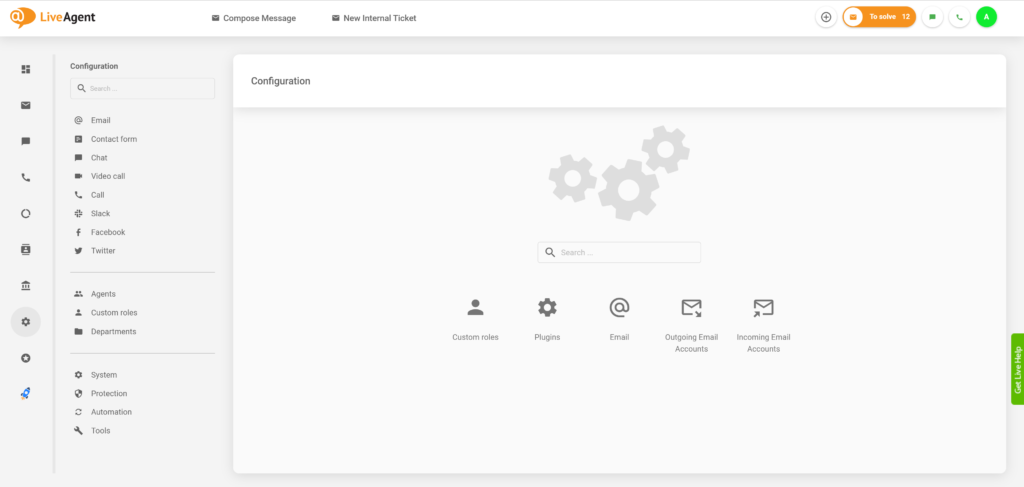
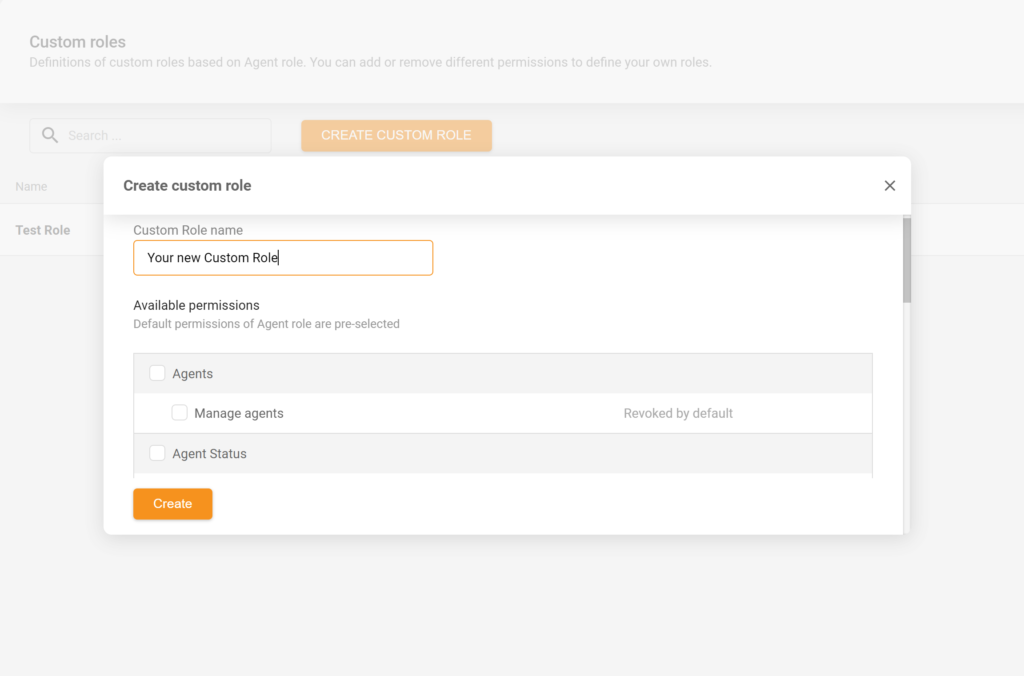
Once you’re in this section, click on Create a custom role. Write the name of the role you want to specify, and then select available permissions. Click on create role at the bottom of the window, and you’re finished. You can also change existing permissions anytime you need after creating the role.

Start your free trial today and see results within days.
The best approach is to segment your customer support agents by their specialty and consider what LiveAgent permissions are the most suitable for their role within the help desk. For example, an agent who performs well in a call center setting should not only have access to call center features but also knowledge base features. This can be helpful when adding new information, such as answers to frequently asked questions by customers over the phone.
The same applies to a live chat agent, who will also require email ticketing features to get in touch with a customer after a live chat query resolution.
If you’re entirely new to creating a custom role from scratch and choosing permissions for your agents, start simple and create basic roles first. Add permissions for each agent according to your or their preference. If they need more or fewer permissions, you can always edit them when necessary and adjust responsibilities.
Custom roles offer a variety of permissions that can be combined and mixed for maximum flexibility. Here’s the complete list of permissions available:
The latest tips and deals delivered straight to your inbox.
In case you need to edit custom role permissions and add or remove additional privileges, you can always do so in the configuration screen. Go to Configuration > Custom roles in your LiveAgent account and click on the role you want to reconfigure. A new window will open up. In this window, you can change the name of the role, as well as change the level of access to users by clicking on the Change button next to Modified permissions. The permission change process remains the same as the initial setup.
When in Configuration > Custom roles, click on the role you want to remove. Scroll down in the new window and find the ‘Danger zone" section. You can delete any custom role by clicking on the Delete button. Note that once you delete a role, there is no going back. In case you want to restore a previously deleted role, you have to create a new one and select the permissions again.
Discover LiveAgent's powerful features that streamline communication, increase efficiency, and boost customer satisfaction.
Boost productivity and enhance customer experience with custom agent roles in LiveAgent. Easily assign specialized roles to streamline tasks and improve agent s...
Define roles for agents in LiveAgent to boost productivity and optimize service. Explore agent, admin, and owner roles. Try free now!

Help desk agents provide customer support via email, chat, phone, and more, resolving issues like billing and troubleshooting. LiveAgent helps manage agents wit...
Join our community of happy clients and provide excellent customer support with LiveAgent.

Cookie Consent
We use cookies to enhance your browsing experience and analyze our traffic. See our privacy policy.