Help desk contacts in LiveAgent store essential customer information for personalized marketing and service. Create custom fields to manage data like language preferences. Enhance customer satisfaction and sales with tailored and knowledgeable interactions.
Contacts
Customer Management
Help Desk
What are help desk contacts?
Help desk contacts store essential information about your customers, including their name, email, phone number, and other personal information. In addition, help desk software like LiveAgent enables you to create custom contact fields to store unique information about your contacts, such as their shoe size or car model.
What information can you store in your contacts?
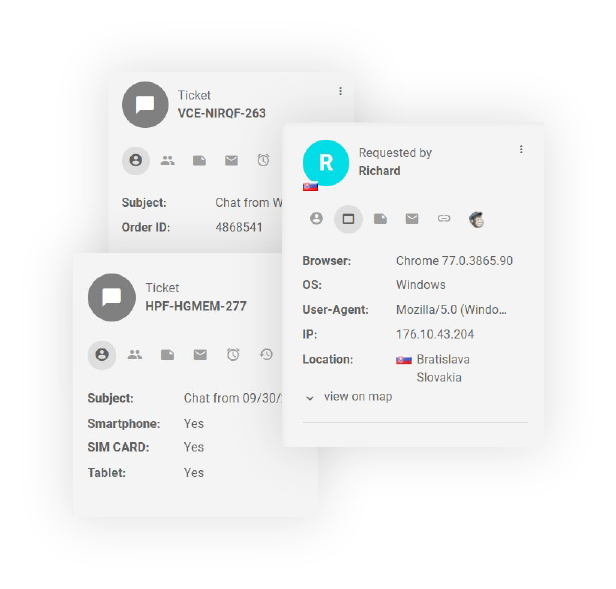
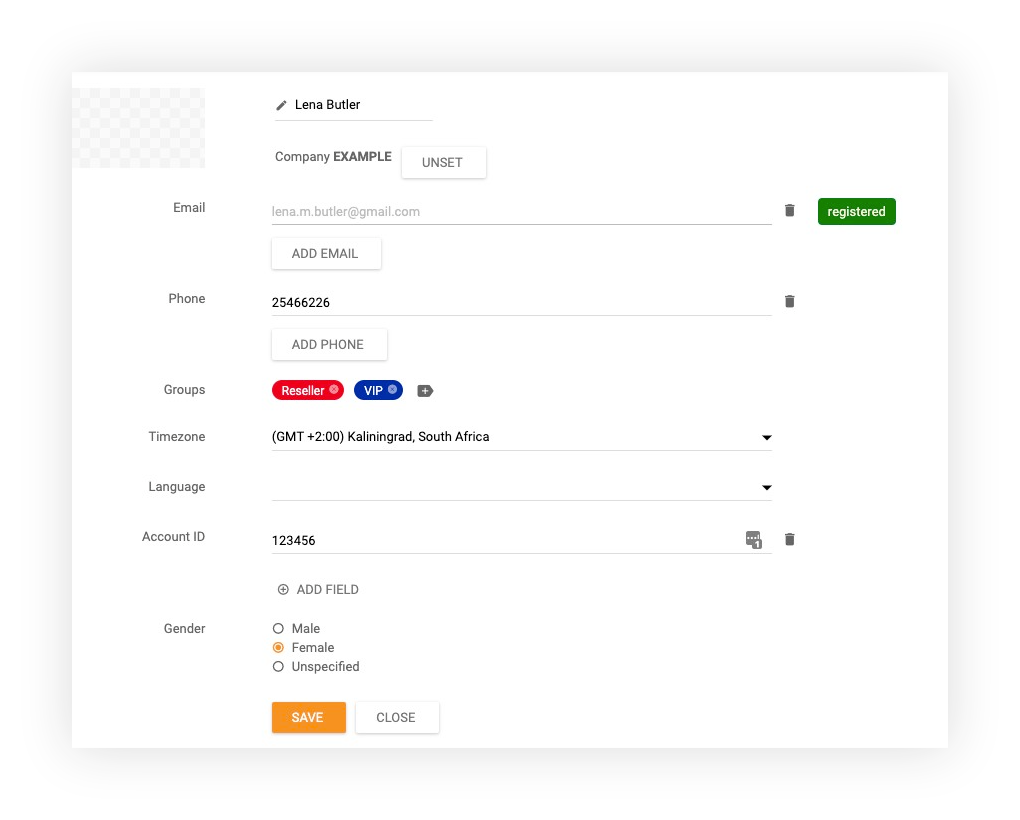
LiveAgent’s contacts feature can store the following information about your customers:
First and last name
Avatar (photo/profile picture)
Multiple email addresses
Multiple phone numbers
Timezone
Gender
Company and job position
Language
IP address
Browser information (such as Google Chrome)
Contact groups (the contact groups you assign them to, such as VIP customers or Spanish speakers)
Private notes (internal notes that can serve as reminders – such as do not call at 11:00 AM)
The contact’s tickets (all tickets that they’ve submitted across various communication channels)
Custom information
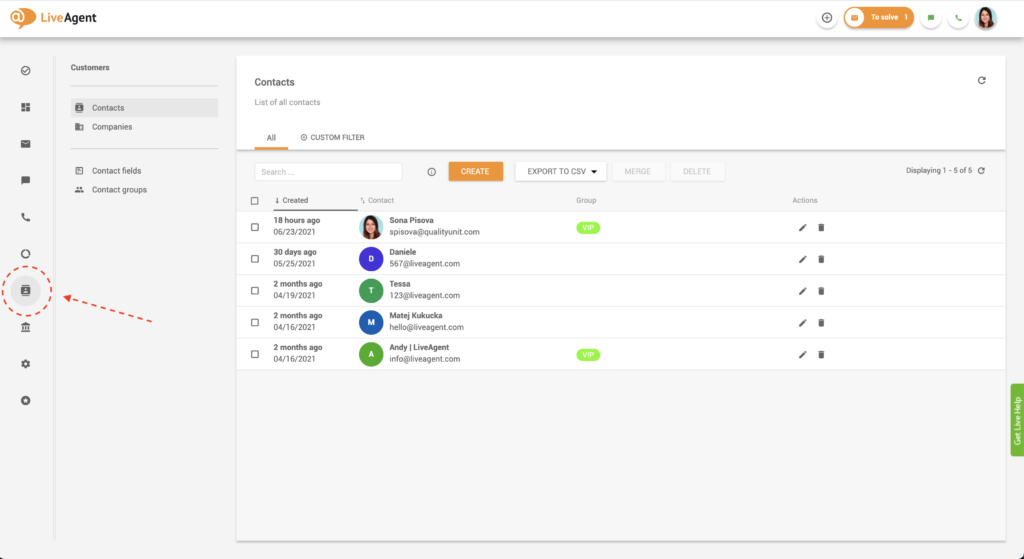
Where can I find my contacts?
Log in to LiveAgent
Click on Contacts
To create a new contact, simply click on the orange Create button. To view, add, or edit existing contact information, click on the desired contact and fill in or adjust the necessary information.
How can you create unique contact fields?
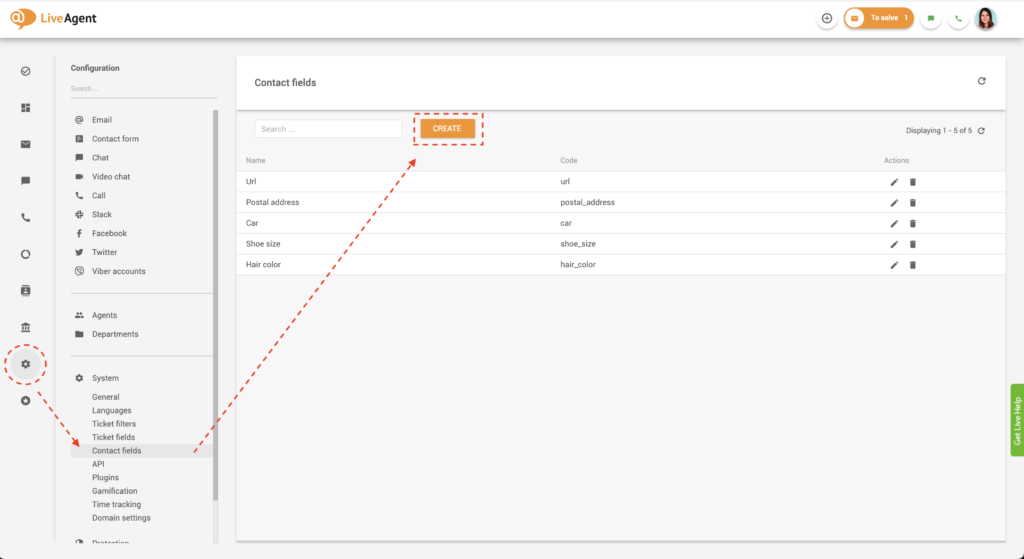
Method 1: Creating contact fields through Configuration
Log in to LiveAgent
Click on Configuration
Click on System
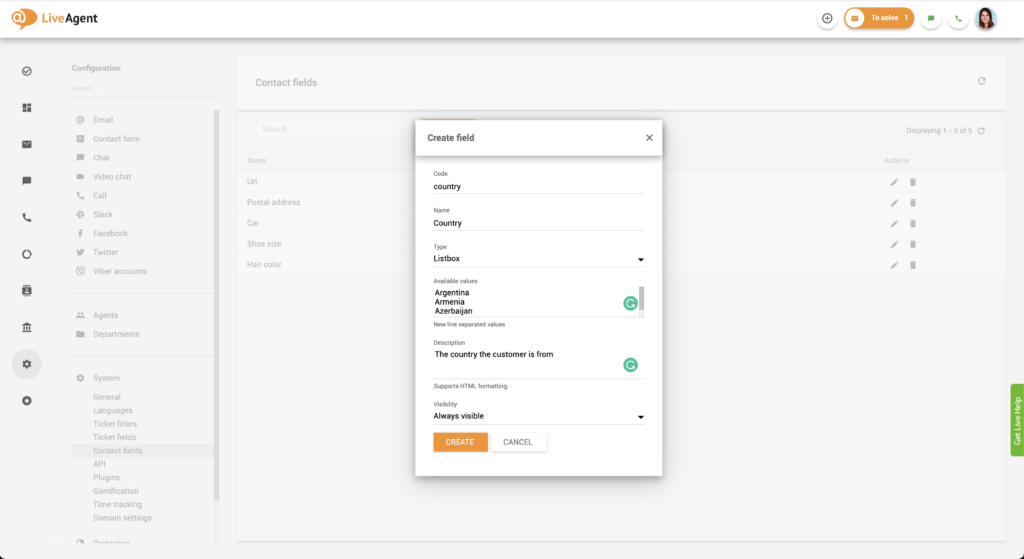
Click on Contact fields
Click on the orange Create button
Set a code name for your custom contact field. This could be something like “hair_color” or “country.” Please note that the code can only contain lowercase letters, numbers, hyphens, or underscores. No spaces are allowed.
Name your custom contact field. This time you can name it “Hair color” or “Country” without any formatting restrictions.
Click on Type and select the input option that suits you best. You can choose from a textbox input, list box, checkbox, checkbox group, or postal address.
Optional: Click on the description and set a description for the custom contact field. The description can provide additional information regarding the contact for you and your staff.
Click on Visibility and select whether you want the custom contact field to be visible whenever you create a contact.
Click on Create
Method 2: Creating a contact field directly in your contacts
Alternatively, you can also create a unique contact field directly in your contacts:
Log in to LiveAgent
Click on Contacts
Click on the desired contact
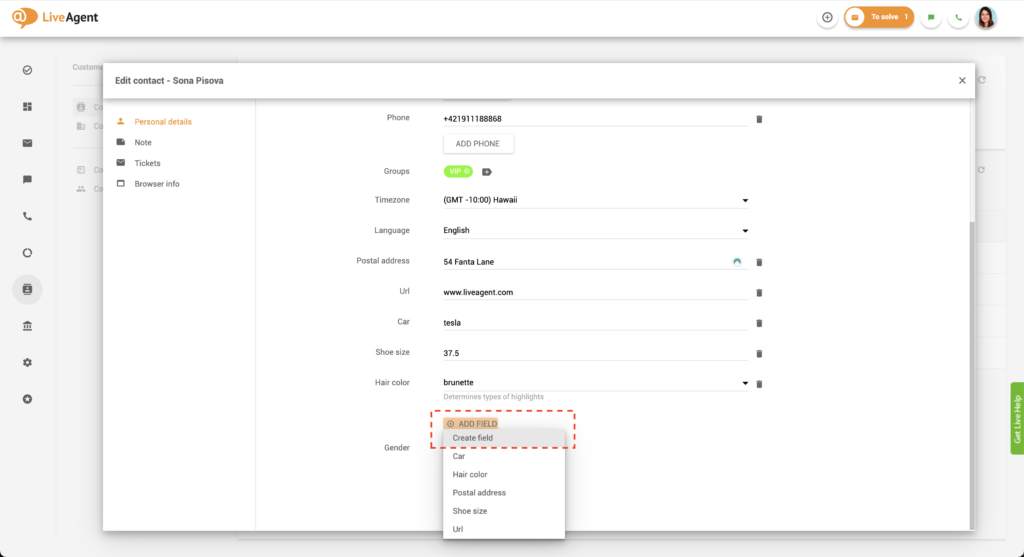
Click on Add field
Click on Create field
Follow steps 6-11 from Method 1 above.
Please note that if you don’t choose ‘Always visible" in step 10, you will have to click on “Add field” to see or select the contact field you will create in the future.
Why is it beneficial to build customer profiles through the help desk contacts feature?
More knowledgeable service
Creating thorough contact cards can help your agents provide better service for your customers. The more information you collect, the easier it will be to provide knowledgeable and relevant answers to customer questions. For example, let’s say you work in the automotive industry. A potential customer has been interested in a Mercedes AMG but is still on the fence about making a purchase. If you record this information on their contact card, including any extra specifications in the notes section, you will be able to leverage them in the future. The next time they contact you, you can impress them by remembering the model and brand of car they were interested in. They won’t have to repeat their wants and needs, which most customers consider poor customer service.
More personalized service
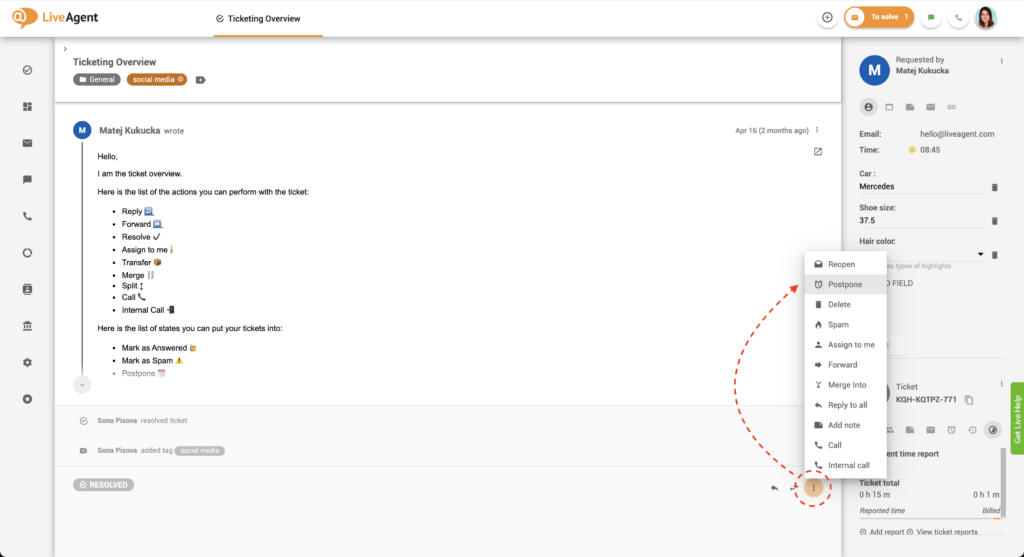
Filling out contact cards can also help you personalize your sales, marketing, and support efforts. For example, let’s say a potential customer contacts you via email. They have a question about a particular pair of shoes, namely their price. The potential buyer wants to know if there’s a discount and if there will be one in the future. By recording this information on their contact card, you’ll be able to reach out to them proactively once the product goes on sale. You could do this by postponing the ticket inside your ticketing system until the sale is live.
You could go a step further and even check their shoe size in their contact card. Then you could reach out to the customer and say that the product they’ve had an eye on for a few weeks is finally on sale, and you have a pair in their size. This type of customer service is what customers desire – going the extra mile. What’s more, you can be sure that you’ll gain a loyal customer and brand advocate after this type of interaction.
Improved customer satisfaction
By creating exceptional customer experiences with personalized and knowledgeable service, you’ll keep your customers satisfied with your company. Keeping them happy can lead to long-term relationships and provide additional advantages such as favorable reviews, brand advocacy, and repeat purchases.
More sales
The more satisfied your customers are with your service and marketing efforts, the more purchases they make. They also bring in new customers by recommending your business and sharing their positive experiences with friends and family. If you keep providing exceptional customer experiences, you’ll create a beautiful cycle of happy, loyal customers bringing in new customers that keep generating new revenue.
Knowledge base resources
Want to learn more about help desk contacts? Check out our knowledge base, academy, and blog that cover all there is to know.
Discover just how easy it is to provide knowledgeable and personalized service with help desk contact cards. Try it today for free with our 30-day free trial
. No credit card is required.
Frequently asked questions
Help desk contacts store essential information about your customers, including their name, email, phone number, and other personal information. Help desk software like LiveAgent enables you to create custom contact fields to store unique information about your contacts, such as their shoe size or car model.
In addition to personal information, help desk software like LiveAgent enables you to create custom contact fields to store unique information about your contacts, such as their shoe size or car model.
Log in to LiveAgent and click on Contacts. To create a new contact, click on the orange Create button. To view, add, or edit existing contact information, click on the desired contact and fill in or adjust the necessary information.
Log in to LiveAgent, click on Configuration, then System, then Contact fields, and click on the orange Create button. Set a code name for your custom contact field using only lowercase letters, numbers, hyphens, or underscores. Name your custom contact field, select the input type, and set visibility options.
Building customer profiles enables you to deliver more knowledgeable and personalized support, improve customer satisfaction, and increase sales through better understanding of customer needs and preferences.
Transform your customer support experience
Discover LiveAgent's powerful features that streamline communication, increase efficiency, and boost customer satisfaction.
Contact Fields - Help Desk Customer Information Management
LiveAgent's contact fields store detailed information about contacts, like name, email, and job position. Create unlimited custom fields to enhance sales, marke...
Web contact cards are browser extensions by LiveAgent that display contact info for people and businesses, enhancing personalized marketing and customer service...
LiveAgent's companies feature helps organize and store company information in your help desk. Customize contact fields, group contacts, and view tickets easily....
5 min read
Companies
Contacts
+1
You will be in Good Hands!
Join our community of happy clients and provide excellent customer support with LiveAgent.