Valentine's Day promotion background
14.Feb - 13.Mar 2026

Valentine deal

AI UNLOCKED
For new and existing customers for 3 months
Agents

Agents

Agents Help desk Customer support Ticket management

What is a help desk agent?

Help desk agents are customer support representatives. They provide technical assistance and answer any questions that potential and existing customers may have about your business, products, or services. In other words, a helpdesk agent plays a crucial role in ensuring that customers receive timely and accurate support.

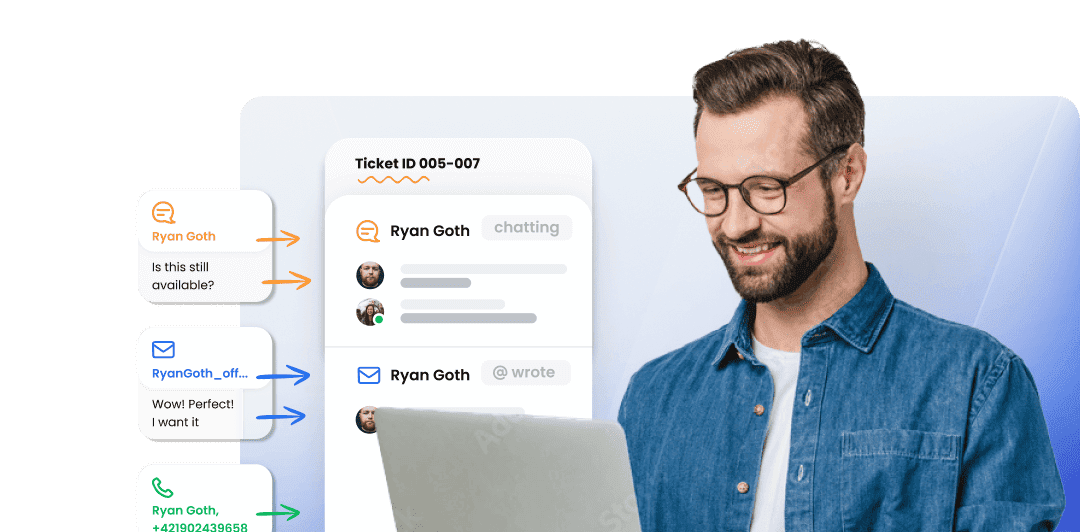
Agents mockup

What does a help desk agent do?

Help desk agents can have different roles based on their industry and the business they represent. However, the common denominator is that help desk agents offer assistance via email, live chat, the phone, and often on social media and in person. They usually resolve issues related to:

  • Billing
  • Refunds
  • Bugs
  • Troubleshooting
  • Functionality
  • Availability

Some help desk agents also prepare knowledge base articles and technical guides that explain how to set up, troubleshoot, and use the products/services their company is selling.

How to add agents to your help desk

To invite agents to your help desk, you need to be the owner or administrator of your LiveAgent account. Please note that support agent cannot add/invite other agents into the ticketing software.

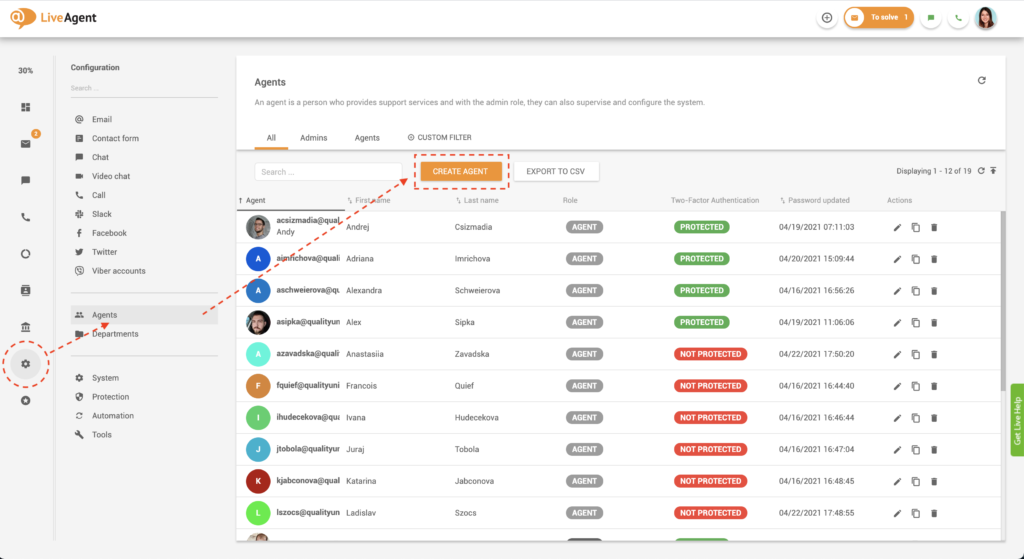
  1. Log in to LiveAgent.
  2. Click on Configuration.
  3. Click on Agents.
  4. Click on the orange Create Agent button.
Create agent button
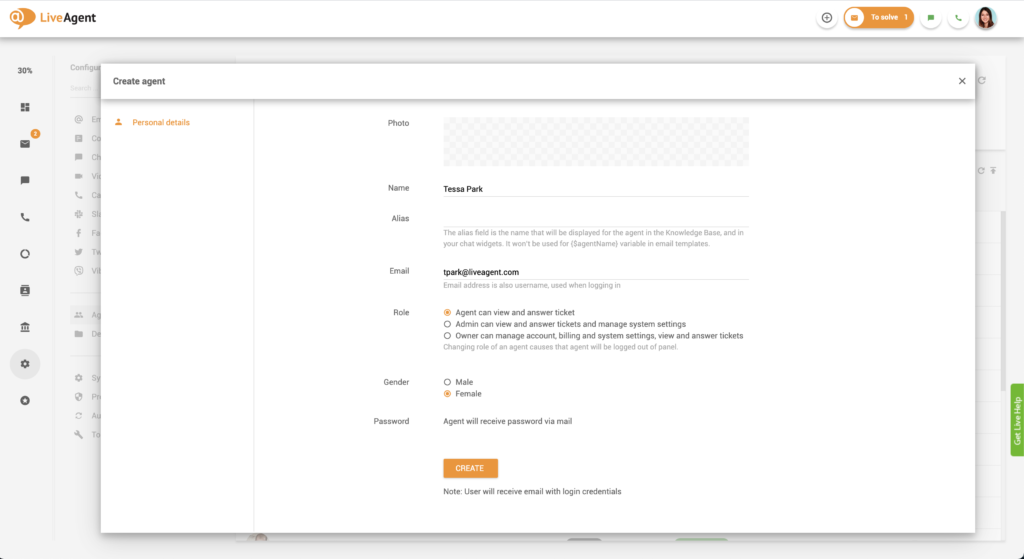
  1. Write their name in the Name panel.
  2. Write their email address in the Email section.
  3. Select the Role you want to give them.
  4. Select their Gender.
  5. Click on the orange Create button.
Create agent form

Once you click the Create button, the customer support agents will receive an email invitation to your help desk that will contain their automatically generated login credentials.

How many agents can I invite into my LiveAgent help desk?

LiveAgent help desk software enables you to invite an unlimited number of customer support agents into your account. However, please note that adding new agents to your help desk will increase your monthly subscription price unless you’re using a free LiveAgent account.

How can I delete an agent?

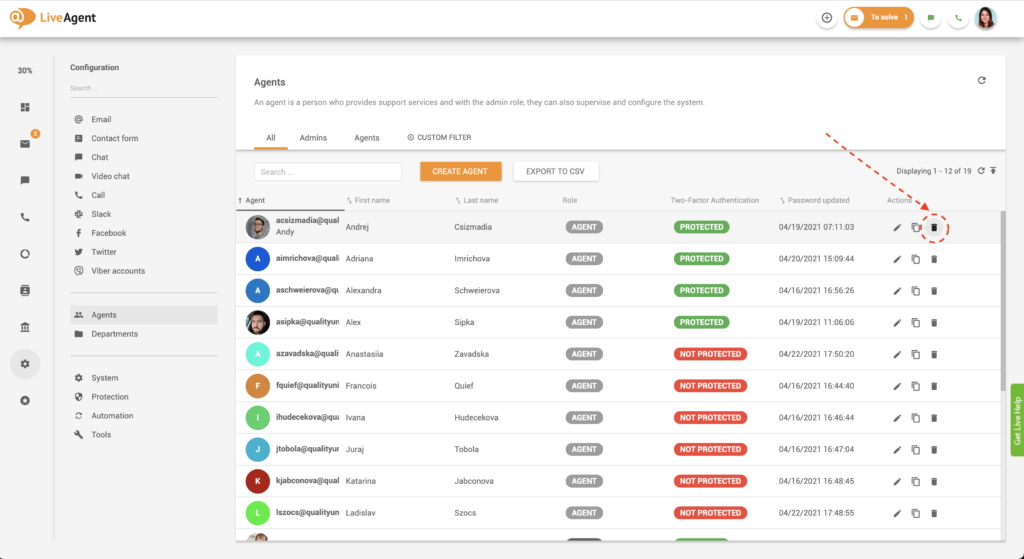
  1. Log in to LiveAgent.
  2. Click on Configuration.
  3. Click on Agents.
  4. Find the trash/bin button on the right-hand side of the agent’s name. Click the button.
Delete agent button
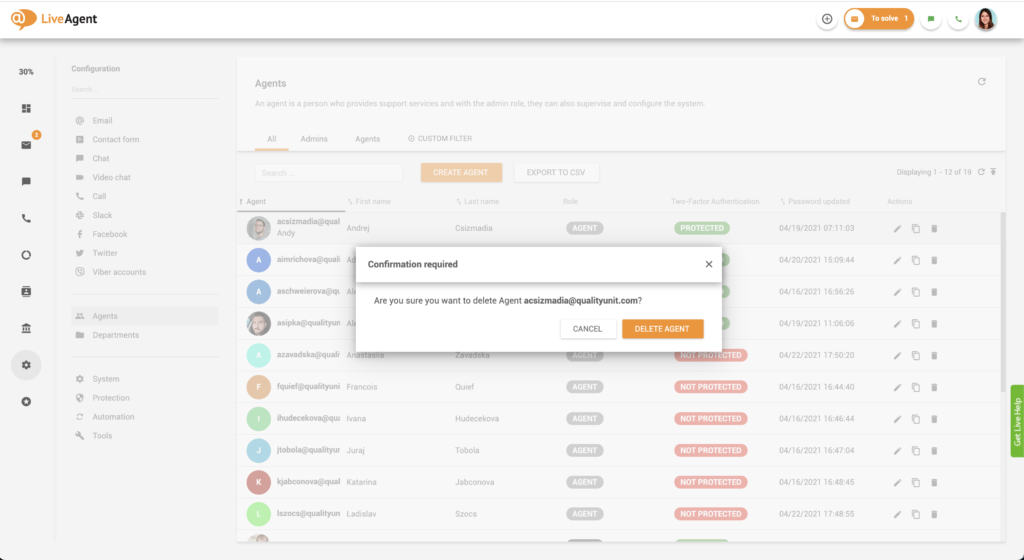
  1. A confirmation message will pop up. Confirm your choice by clicking on the orange Delete agent button.
Delete agent confirmation

What can an agent do in LiveAgent?

Agents can take care of all the customer requests, answer chats, phone calls, and messages from all other channels that are connected with your help desk software. They also have the option to manage knowledge base articles. They do not, however, have access to configuration options or reporting/analytics dashboards. Agents can only access their work reports.

What other user roles are there?

  • Admin – Admins can configure the system, view reports, and manage other users.
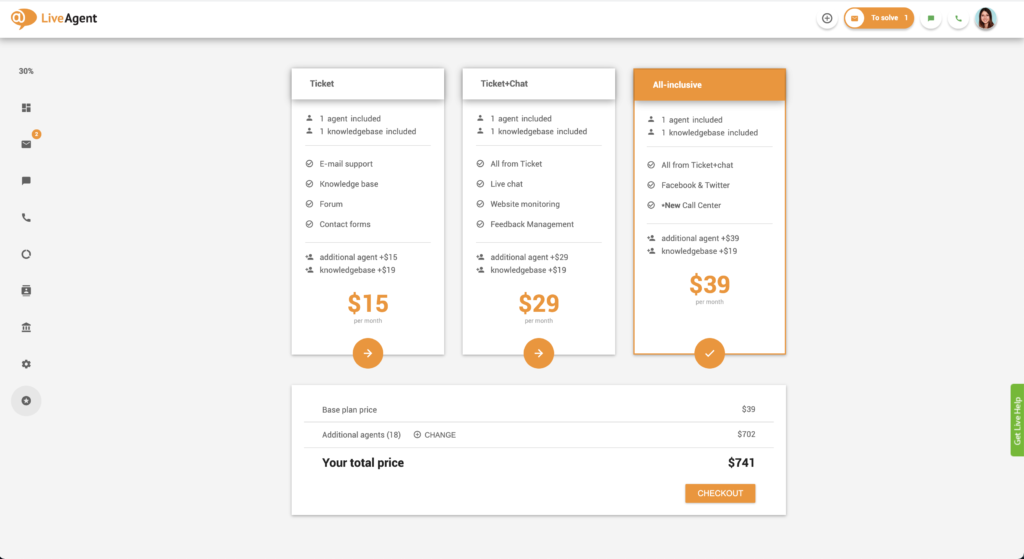
  • Owner – The owner is a particular type of administrator that, in addition to configuring settings, viewing reports, and managing users, can change/upgrade their LiveAgent subscription plan. They also have access to billing information and invoices.
Owner upgrade option

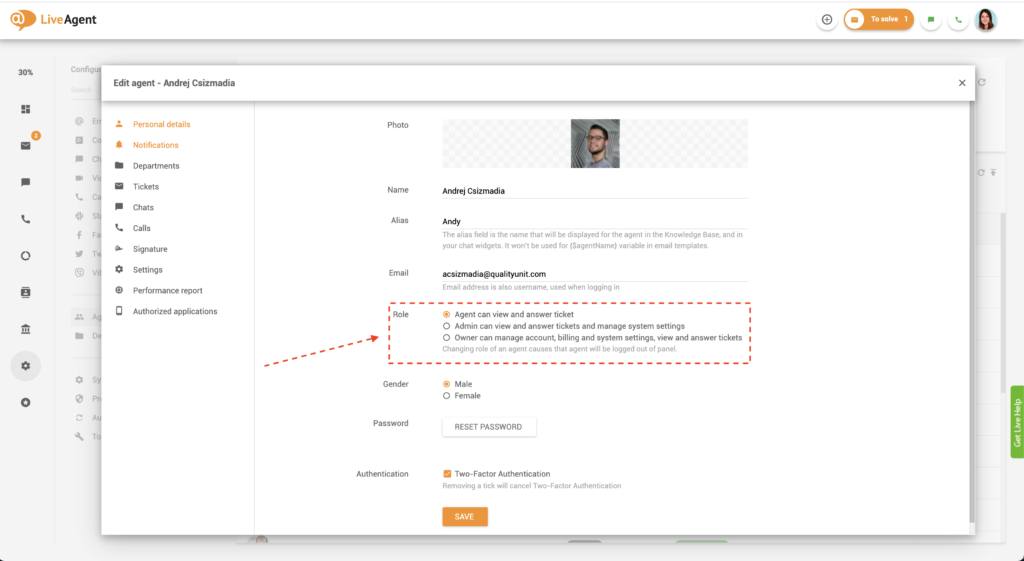
How to modify agent permissions

  1. Log in to LiveAgent.
  2. Click on Configuration.
  3. Click on Agents.
  4. Find the pencil/edit button on the right-hand side of the agent’s name. Click the button.
  5. Find the Role field. Select the role you want to give them.
  6. Click on the orange Save button.
Edit agent role

How can agents modify their agent profiles?

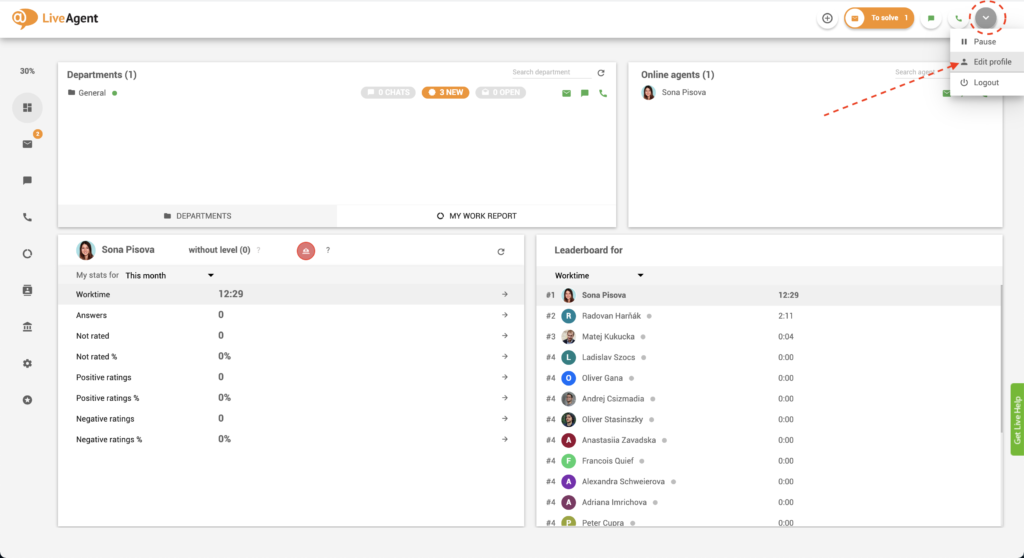
To edit their profile and preferences, agents simply need to click on their avatar/profile picture in the upper right-hand corner of the screen and click on Edit profile.

Edit agent profile

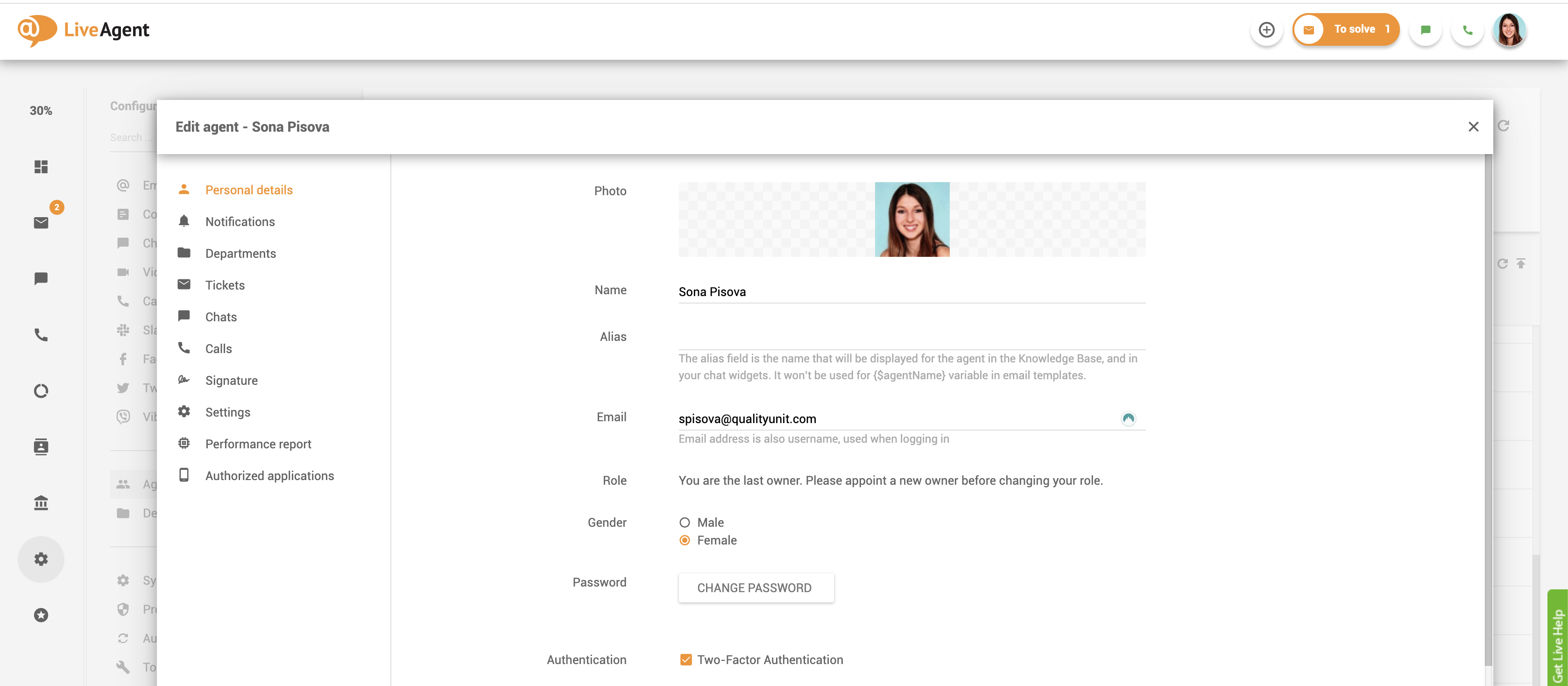
What can agents modify in their agent profile?

Personal details

  • Photo/avatar (profile picture)
  • Name
  • Alias
  • Gender
  • Password
  • 2-Factor Authentication
Agent personal details

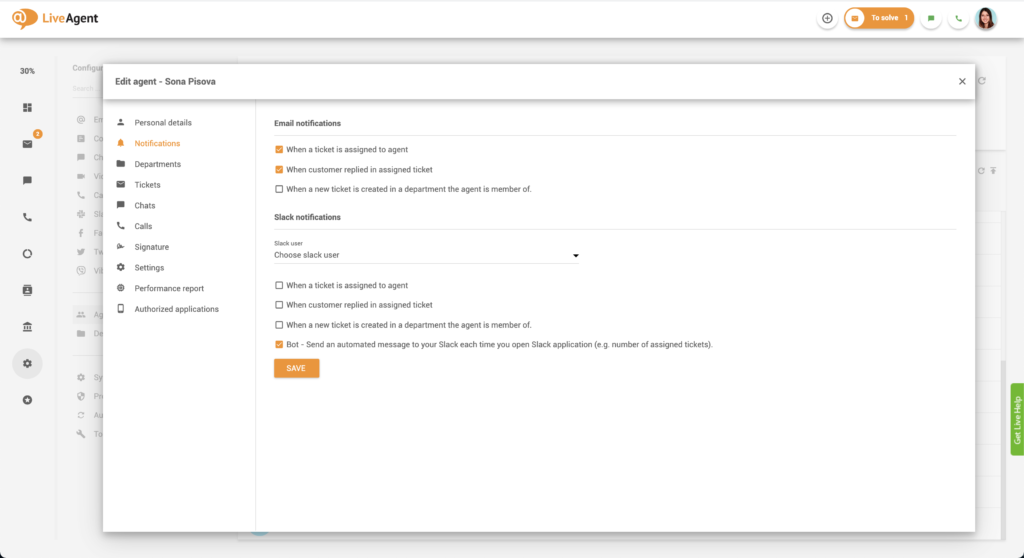
Notifications

  • Email notifications
  • Slack notifications
Agent notifications

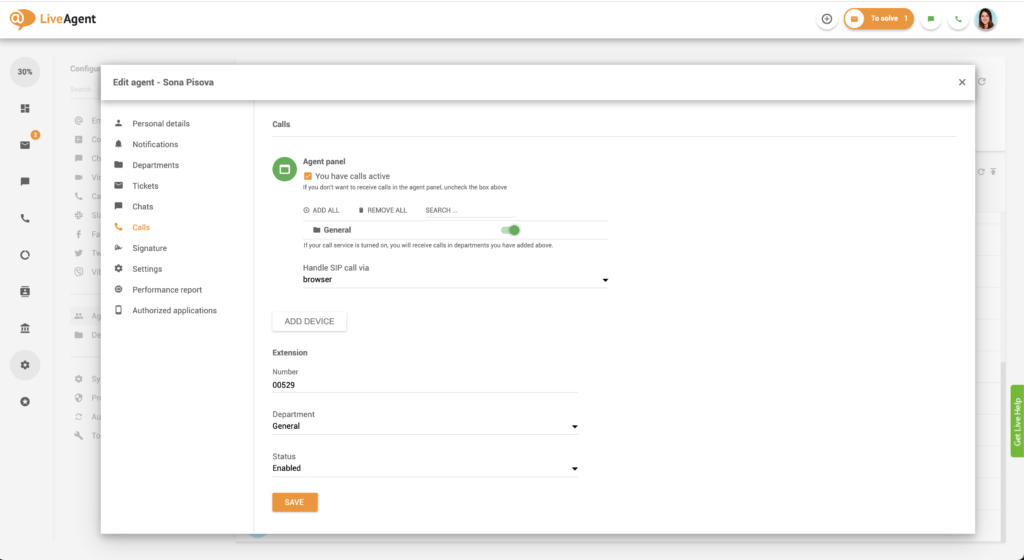
Tickets, chats, and calls

  • Departments from which you will receive tickets, chats, and calls
  • Call center devices
  • Call center extension
Agent calls settings

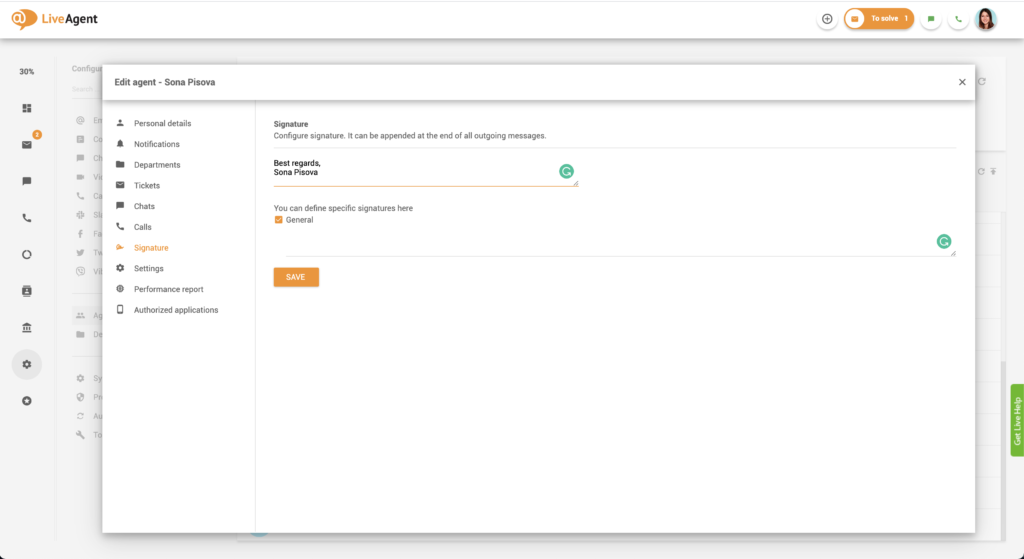
Signature

  • The signature that will be added at the end of all outgoing messages
Agent signature

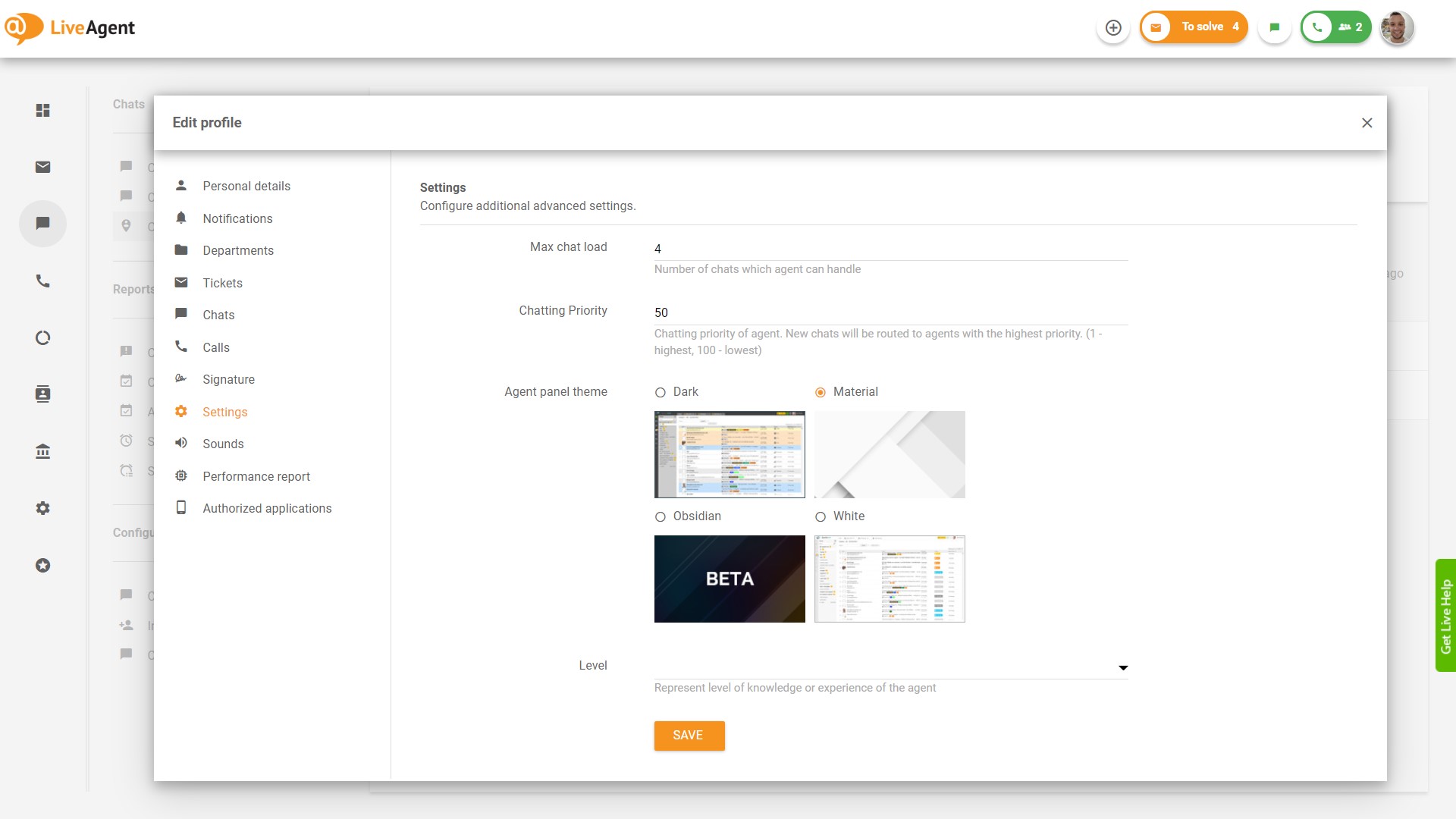
Settings

  • Agent panel theme
Agent settings

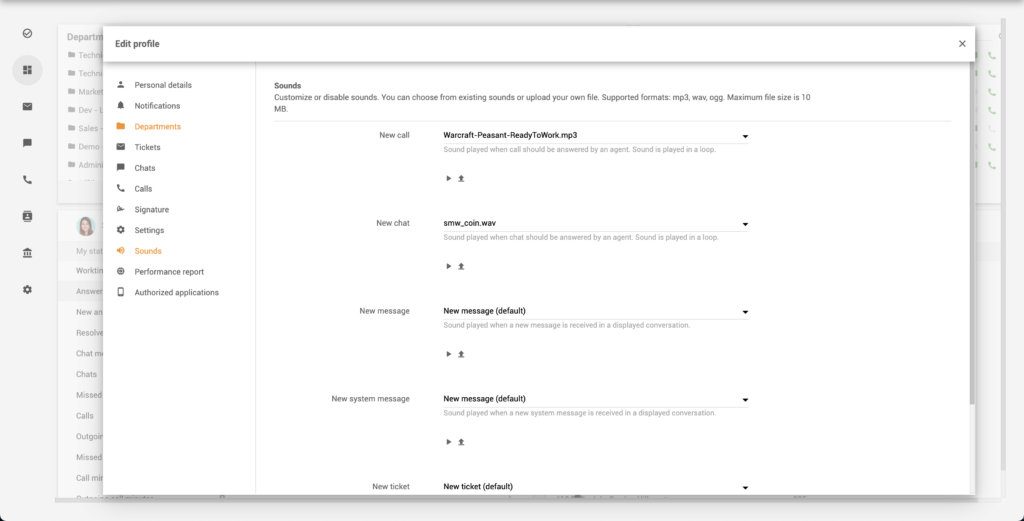
Sounds

  • Notification sounds for new calls, new chats, new messages, new system messages, and new tickets
Agent sounds

Performance report

  • Performance report values (You will be able to view your performance report by month, week, day, hour, etc.)
Agent performance report

Why should I add agents to my account?

Unless you’re a tiny business or a solopreneur, it’s advisable to add agents to your help desk account so you can start answering customer emails, calls, and chats on time. Doing everything on your own can be overwhelming, especially if you have tons of tickets coming in every day. An agent knowledge base helps support agents access the right information quickly, ensuring they can provide accurate and timely assistance.

What skills do I need to become a customer service agent?

Customer support agents need to be excellent written and verbal communicators. They need to have active listening skills, empathy, and thorough knowledge of your products and services. Successful support agents have to seamlessly navigate the company’s IT ticketing software. In addition to that, they should be:

  • Analytical
  • Tech-savvy
  • Able to type fast and accurately (Feel free to try out our free typing test! Can you type as fast as a support agent? Try to reach 80 WPM)
  • Able to explain complicated concepts in easy to understand terms
  • Well versed in dealing with stressful situations
  • Know how to control their emotions
  • Able to multi-task
  • Flexible in their work schedule
  • Speak more than one language (not required, but preferred)
Thumbnail for LiveAgent Agent Product Tour

Knowledge base resources

To learn more about customer service agents and the skills they need to master, check out our knowledge base, blog, academy, and glossary.

Frequently asked questions

What is a help desk agent?

Help desk agents are customer support representatives. They provide technical assistance and answer any questions that customers and potential customers may have about your business, products, or services.

What does a help desk agent do?

Help desk agents can have different roles based on their industry and the business they represent. However, the common denominator is that help desk agents offer assistance via email, live chat, the phone, and often on social media and in person.

What skills do I need to become a customer service agent?

Customer service agents need to be excellent written and verbal communicators. They need to have active listening skills, empathy, and thorough knowledge of your products and services.

Ready to increase your productivity with more agents?

Discover just how easy customer service can be with LiveAgent. Try our all-inclusive free 30-day trial today. No strings attached, no credit card required.

Learn more

Departments features

Departments features

Help desk departments organize help desks by grouping specialized agents to handle specific queries, improving ticket handling, response times, and workflow eff...

6 min read
Departments Ticket Management +1
Online Visitors Feature for Customer Support

Online Visitors Feature for Customer Support

Track website visitors in real-time with LiveAgent's Online Visitors feature. View visitor activities, locations, and referrers to enhance customer support and ...

4 min read
Online Visitors Live Chat +2
Agent Role
Agent Role

Agent Role

Define roles for agents in LiveAgent to boost productivity and optimize service. Explore agent, admin, and owner roles. Try free now!

3 min read
Customer support Help desk +2

You will be in Good Hands!

Join our community of happy clients and provide excellent customer support with LiveAgent.

Post Affiliate Pro Dashboard - Campaign Manager Interface