



Time rules features
Time rules in LiveAgent are time-based automation tools for tasks like help desk clean-up and email reminders. They enhance efficiency by automating repetitive ...
6 min read
Automation
Ticket Management
+1

Time-based events, or time rules, in LiveAgent automate tasks like assigning, notifying, and resolving issues via time triggers, enhancing workflow and customer satisfaction.

Time-based events are so called Time Rules. Time rules are not triggered by a condition but by a time event instead.
They run in the background at intervals (usually every minute) and check that the conditions are met. If the result is positive, the rule is executed.
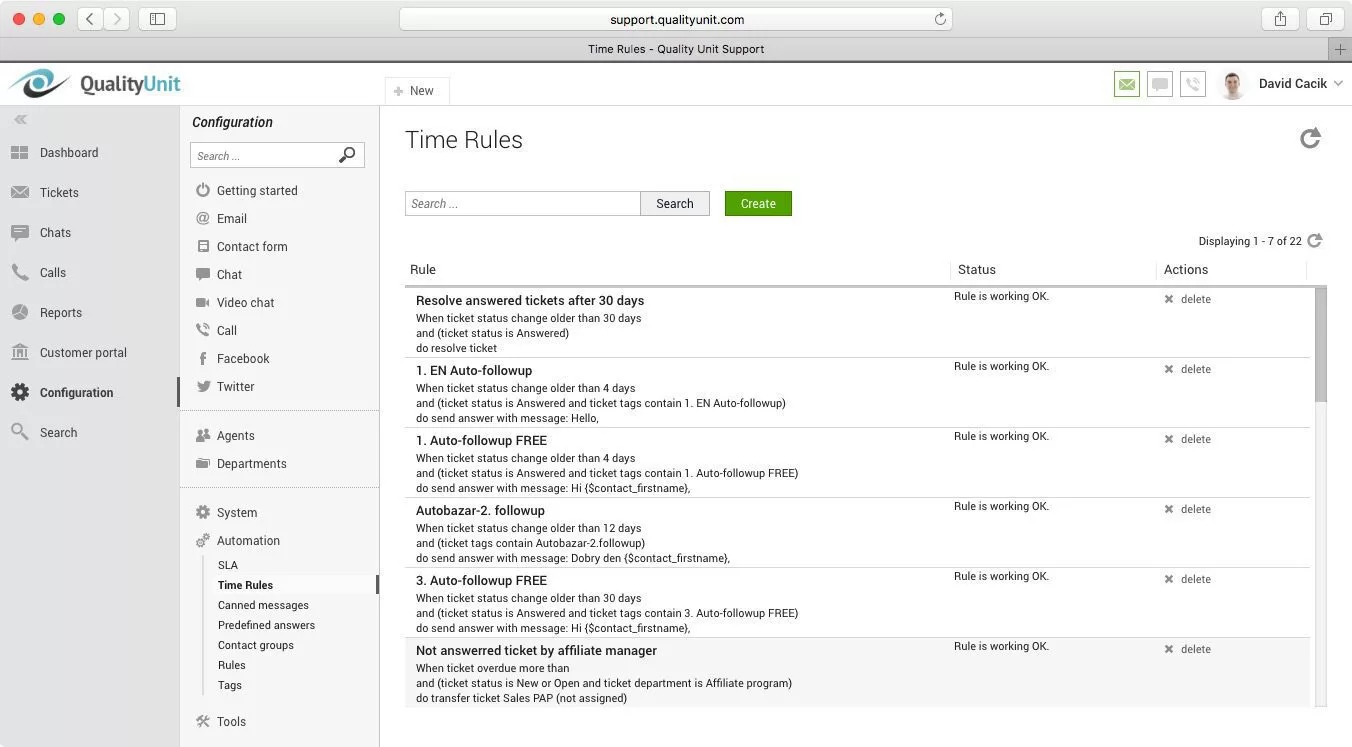
Time rules are the foundational elements of time-based events. They define the conditions under which an event should be triggered based on time. For example, a time rule might specify that a follow-up email should be sent 24 hours after a ticket is resolved if there has been no response from the customer.
As described by LiveAgent, time rules are not triggered by conditions but by specific time events. They run in the background, frequently checking if conditions are met to execute the predefined actions.
Automation rules are the broader category under which time-based events fall. They encompass all automated actions in a help desk system, including those triggered by time, conditions, or user actions. Automation rules help streamline operations by reducing manual interventions.
Every time-based event operates based on a set of conditions and actions. Conditions determine when the event should occur, while actions define what happens when those conditions are met. For example, a condition might be “24 hours after ticket creation”, " and the action could be “send escalation email.”
These are specific criteria that focus on the timing of events. Examples include:
Time-based conditions are crucial for maintaining timely responses and ensuring customer satisfaction.

The latest tips and deals delivered straight to your inbox.
Time-based events often consider business hours to ensure actions are taken during operational times. For instance, a rule might defer sending a notification until the start of the next business day if the condition is met outside business hours.
Ticket properties refer to the attributes or metadata associated with a support ticket. Time-based events can modify ticket properties based on elapsed time, such as changing the ticket status after a certain period of inactivity.
A common use of time-based events is to escalate tickets that remain unresolved beyond a certain timeframe. For instance, if a ticket is not addressed within 48 hours, it might be automatically assigned to a senior support agent or flagged for managerial review.
Service Level Agreements (SLAs) often rely on time-based events to ensure compliance. If a response or resolution does not occur within the agreed timeframe, time-based triggers can notify support teams or adjust ticket priorities.
Automated follow-ups are essential for maintaining customer satisfaction. Time-based events can schedule follow-up emails or calls to check on customer satisfaction and gather feedback after a ticket is closed.
To prevent ticket backlog, time-based events can automatically close tickets after a specified period of inactivity, provided the customer has been informed and no further action is required.
By automating routine tasks and processes, time-based events free up support agents to focus on more complex issues, improving overall productivity and efficiency.
Timely responses and proactive follow-ups enhance the customer experience, leading to higher satisfaction rates. Time-based events ensure that no ticket is forgotten or left unattended.
Automating actions based on time helps maintain consistency in service delivery, ensuring that all customers receive the same level of service, regardless of human factors.
Time-based events help manage workflows by automating transitions and actions, reducing the need for manual oversight and minimizing the risk of human error.
Setting up effective time-based events requires careful planning and understanding of both the software capabilities and business needs. Misconfigured events can lead to unintended actions or missed opportunities.
Time-based events often affect multiple teams and departments. Ensuring that everyone is aligned and aware of the automated processes is essential to avoid confusion and overlap.
While automation improves efficiency, it’s important to maintain a personal touch in customer interactions. Over-reliance on automated responses can lead to a perception of impersonal service.
Regular monitoring and adjustment of time-based events are necessary to adapt to changing business environments and customer expectations. This requires ongoing analysis and refinement.
Time rules in LiveAgent are time-based automation tools for tasks like help desk clean-up and email reminders. They enhance efficiency by automating repetitive ...

LiveAgent's automation rules streamline customer support by automating tasks like ticket transfers, tagging, and resolving issues. These rules, including action...
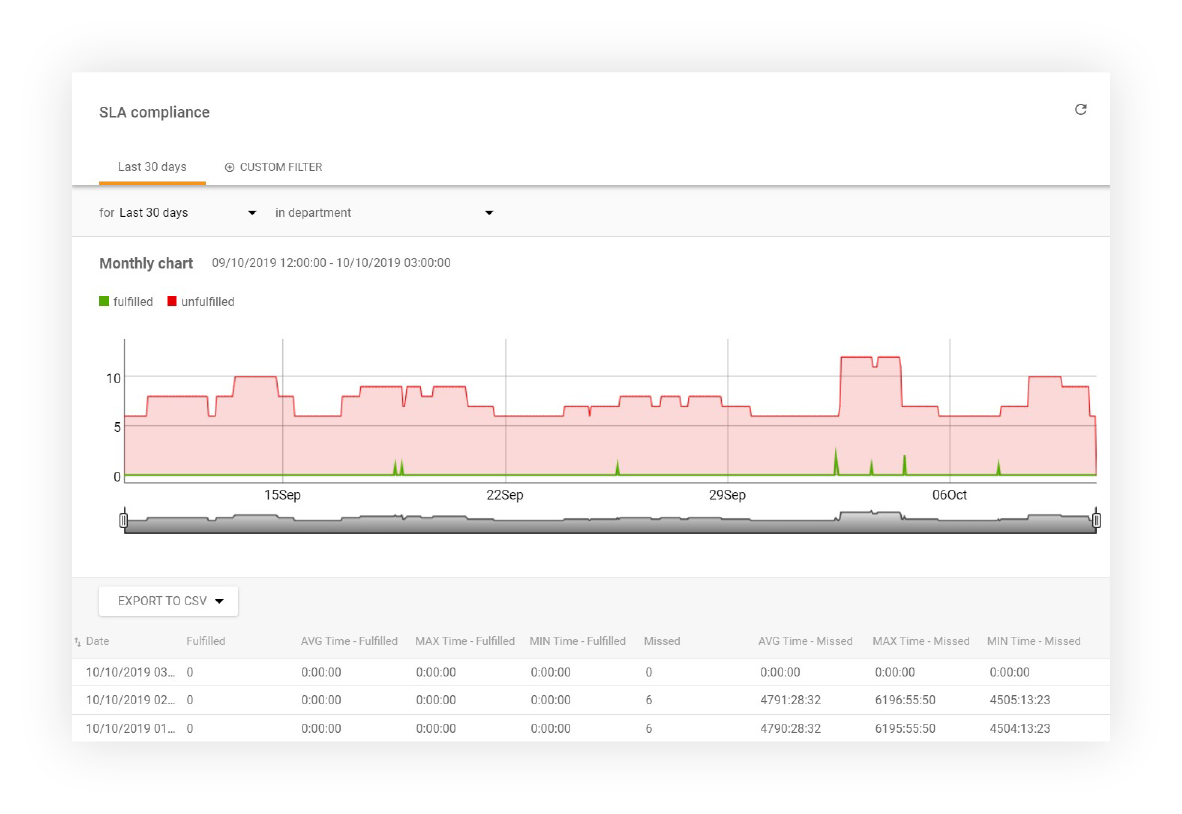
Monitor and track your team's SLA compliance with LiveAgent's reports. Set SLA levels, rules, and export data to CSV. Evaluate performance by department, agent,...
Cookie Consent
We use cookies to enhance your browsing experience and analyze our traffic. See our privacy policy.